










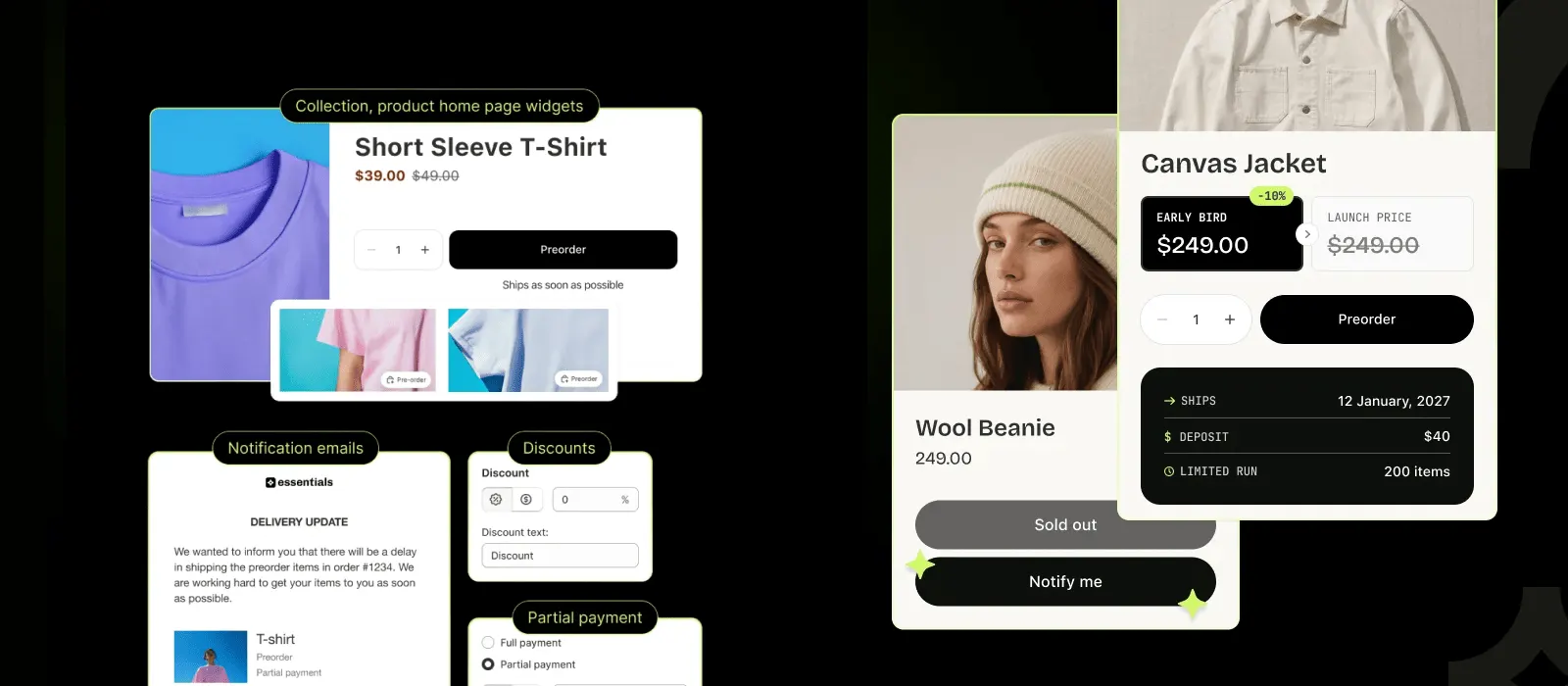








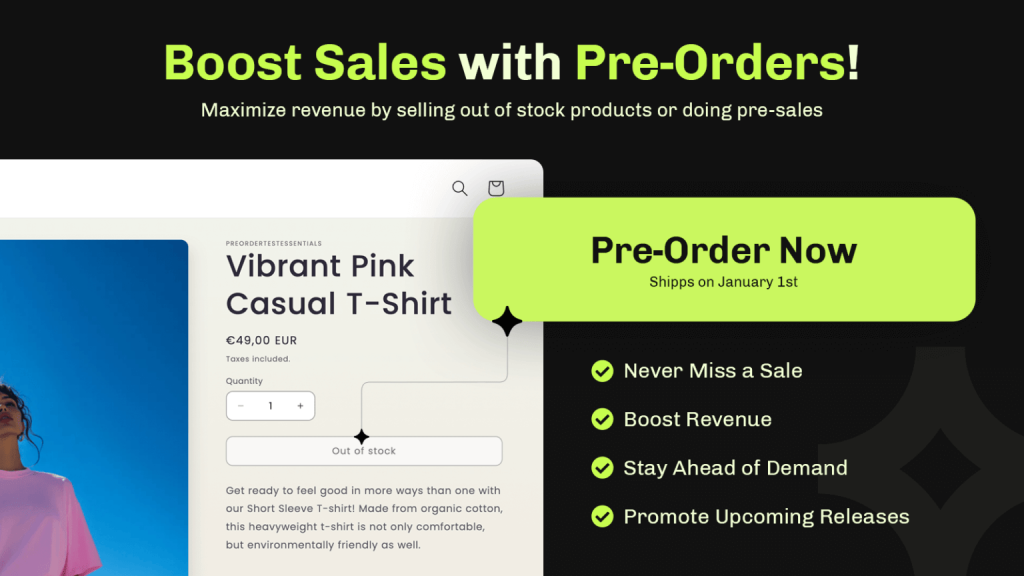
A preorder lets customers reserve a product before it ships. You choose when payment is taken, set the limits and write the delivery wording shoppers see.
Find on Shopify App Store as Essent Preorder Back in Stock
Keep selling with Shopify preorders & back-in-stock alerts
Let customers preorder upcoming products or reserve out-of-stock items, with partial payments, clear limits, and your own preorder wording.
- plan available
- Free
- average rating
- 5.0★
- reviews
- 1,389+
- active stores
- 20,300+
-
Sell before the stock arrives
Let customers preorder out-of-stock or upcoming products, so orders keep coming while your stock is on its way.
-
Preorders that look like your store
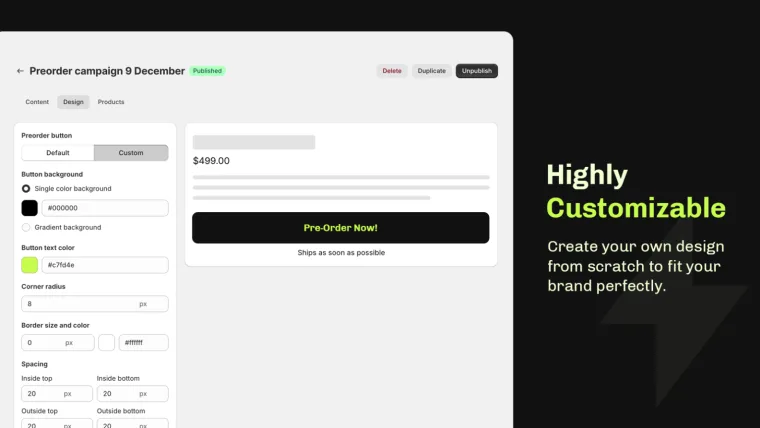
Change the button and the wording, and take full or partial payments, so shoppers know what they pay for and when it ships.
-
Help when you need it
Support is available 24/7 on every plan, including Free, and reviewers often mention fast fixes for theme issues.
What Essential Preorder costs
Pricing
Start free, pay as your preorders grow
Free for 25 preorders and 300 back in stock notifications a month. Paid plans are $4.95, $8.95, $24.95 and $59 for unlimited volume. On paid plans, a preorder over your limit costs $0.25, $0.20 or $0.10 on the first three plans, and 100 extra notifications cost $1, so campaigns keep running. On the free plan, back in stock sending pauses at the limit until the 1st of the next month.
Features
Essential Preorder Back in Stock app Features
-
Preorders
Preorder Options
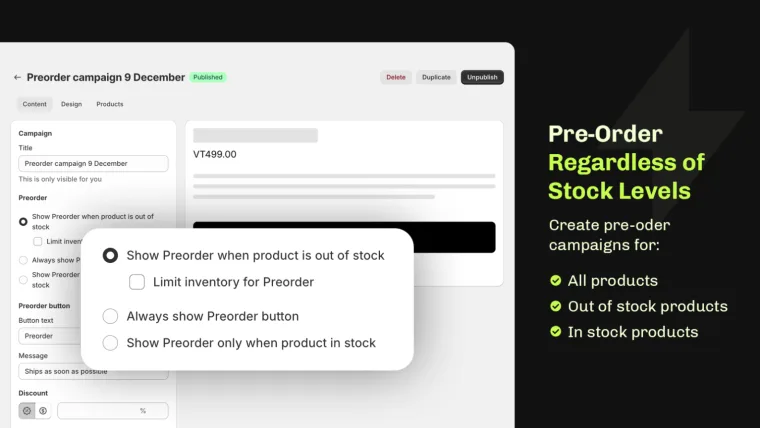
Let customers reserve out-of-stock or upcoming items, so a product that shows "not available" keeps selling.
-
Messaging
Customizable Preorder Texts
Write your own delivery dates, stock updates and preorder policy text, so shoppers know what to expect before they pay.
-
Payments
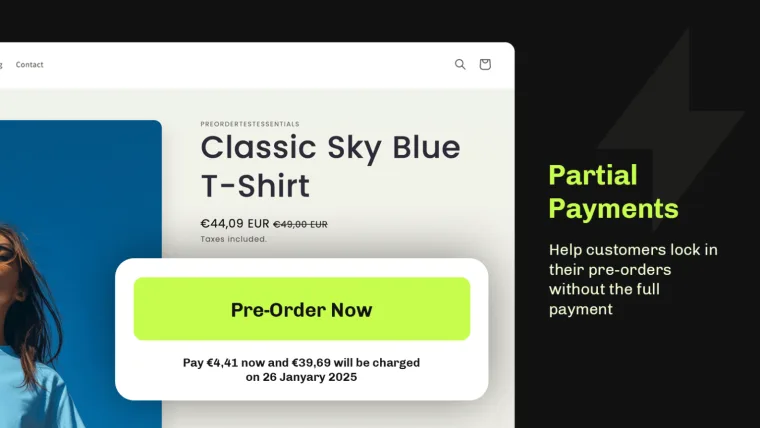
Partial Payments
Let customers pay partially upfront for their orders, making it easy to secure big-ticket items while spreading out the cost.
-
Limits
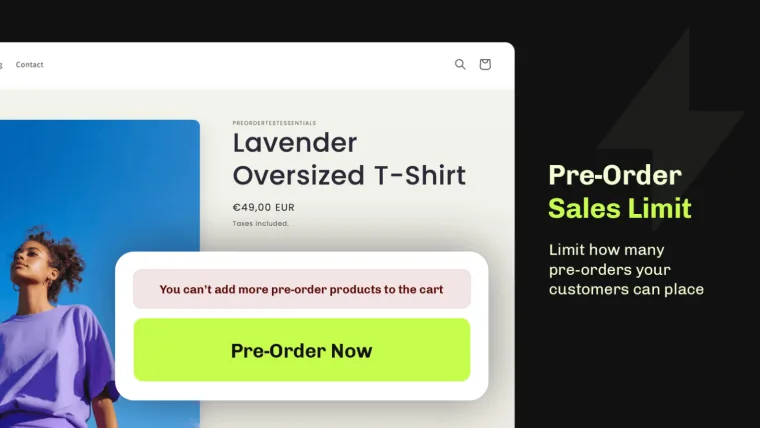
Set Clear Limits
Set clear limits on preorders and backorders to manage stock efficiently and meet customer demand while avoiding overselling.
Back in Stock
Not ready to sell it? Send back in stock alerts instead.
-
Notify me button
Add a Notify me when available button to any sold out Shopify product. It sits under the Sold out button or replaces it, and a product can show Preorder and Notify me together.
-
Back in stock waitlist
Collect emails with a branded sign-up pop-up in your own fonts and colours, with GDPR double opt-in when you need it. Unlimited waitlist sign-ups on every plan.
-
Automatic restock email
The back in stock email goes out automatically when inventory passes the level you set, linking to the product page, the cart or straight to checkout. Send through Omnisend or Shopify Flow instead from Lite.
-
Alerts by market
Map each Shopify market to the locations that stock it, so a Canadian restock only emails Canadian subscribers and your US waitlist keeps waiting for US stock. Starter plan and up.
Need only the back in stock part?
Back in stock
Back in stock alerts have their own page
See where the Notify me button can show, how the restock email works, which integrations it supports and how the 300 free notifications a month are counted.
Orders & fulfilment
Control how preorder orders are fulfilled.
-
Set the fulfilment status
Choose what a preorder does in Shopify the moment it lands: Unfulfilled, On hold until you release it, or Scheduled to release automatically on a date. All three are on the free plan. On hold and Scheduled use Shopify purchase options, so they need Shopify Payments.
-
Mixed carts and order tags
When a customer buys a preorder item and an in-stock item together, the order splits into two fulfilments so you can ship the in-stock half today. Every preorder order and customer is tagged automatically for filters, segments and your 3PL rules.
-
Automate with Shopify Flow
Five Shopify Flow triggers and two actions on every plan: preorder placed, preorder payment failed, back in stock signup created and confirmed, product variant restocked, plus release preorder hold and collect the remaining balance.
Reviews
Essential Shopify Preorder App Reviews
5.0 average on the Shopify App Store
-
We used Essential Preorder for the presale of playmats and it worked great. Setup was simple, customers could order before stock arrived, and we got lots of preorders in our first month. It let us validate demand and plan inventory without stopping sales. Highly recommended for small stores launching new products!
Mundo Kaleido -
This is simple, slick, and does exactly what I hoped that it would. You can offer preorders on products only once they sell out, or have them turned on all the time (give the customer a discount if they choose preorder instead of buy now, etc.). Another great app from Essential
Shi-Zen -
Super easy to use and works like a charm for my preorder drops. I run a streetwear brand and needed upfront preorders across multiple products — this app made the process simple, clean, and fast. The setup took minutes and everything functions exactly how I need. Highly recommend for anyone running limited drops or made-to-order items.
DIEALONEWOLF® -
So far so good! I have a handful of listing in my shop that are specifically for pre-order. What I like is you can customize the "buy button" with specific information according to your needs. It also automatically adds custom tags on the backend of the shopify order to keep everything organized.
NEWBURGH YARN CO.
-
Fantastic App and one of the best solutions I have found for Pre-orders on styles that still have some inventory in sizes so you can offer both pre-order and in stock selling on the same listing. Excellent Customer Care as well - Angelica responded to an integration issue in record time and the team was able to get us all set up and good to go in a few hours.
Nikki Chasin -
The app and customer service are both great. The team is very responsive and turned around a small customization for us quickly. Using Shopify Markets, it puts a “Preorder” label on a product only in markets whose location is out of stock, and leaves it off wherever the product is available. That was exactly what we needed. Highly recommended.
Oeuf -
This is an incredible app! Full featured and works perfectly for my needs. I had been testing multiple preorder apps and this outperforms others that come with a much higher price tag. I really appreciate how easy it is to get setup and had it running in just a few minutes. Preorders are easy to manage and update and have instantly cut down on customer confusion with delivery date expectations.
Steadfast Records -
Great app. Using it for more than a year now mostly for the preorder part and noticed that they keep trying to improve the app in different ways. Reliable and lots of options, without being overwhelming.
Comics.nu by Comicstripshop.com
FAQ
Learn more about preorders and presales
Don’t hesitate to contact the Support if you have any additional questions.
- A customer buys a product before it is in stock or released. Essential Preorder takes payment up front (full, partial, or on release) and lets you set clear delivery rules, so you keep sales you would lose to a Sold out label. For the step-by-step setup, see our guide on How To Set Up Preorder On Shopify.
- Yes. Change the buttons, notifications and product labels to match your store's branding. The guide on How To Set Up Preorder On Shopify walks through each setting.
- In the app settings you can enable preorders for specific products, entire collections, or all products in your store.
- Yes. You can take part of the payment upfront and collect the remaining balance later, including with a Shopify Flow action. Partial payments are included on the free plan. Learn more in our blog on How To Accept Partial Payment On Shopify.
- Yes! The Essential Preorder Back in Stock app provides automatic notifications to keep customers updated about delivery or stock changes.
- A presale sells a new or upcoming product before it ships. With Essential Preorder you pick the products, set an order limit, choose when payment is taken and write the delivery date shoppers see. Setup takes a few minutes, and the free plan covers 25 preorders a month.
- Yes. You can set inventory caps at the variant level to control how many preorders are accepted. This helps you preserve scarcity, manage supply, and avoid overselling.
- Yes. Shopify discounts are compatible with preorders as long as you configure them with Purchase type = Both or Subscriptions. This ensures they apply correctly to selling-plan items.
- In many cases, yes. Most product-options apps work as long as they write line-item properties and don’t fully replace the product form. We maintain compatibility notes for common apps to help you check before setup.
- Yes. Most modern Online Store 2.0 themes work with minimal or no edits. For themes that need adjustments, we provide quick fixes and document any required selectors.
- Yes. Preorders follow standard Shopify order management rules. You can cancel orders, issue refunds (including deposits), or adjust quantities according to your store’s policies.
- We recommend displaying estimated ship or release dates directly on product pages and in the cart. Reinforce this information in order confirmation emails and on your Preorder Policy page to keep customers informed and reduce questions.
- Yes. Preorders can be enabled at the variant level. This means you can offer some variants for preorder while keeping others available for immediate purchase.
- Yes. Always be transparent about delivery timelines, refund policies, and deposit terms in your storefront policy. In addition, check your local consumer protection laws and card-network rules to ensure compliance.
- In most cases, yes. Preorders generally work with cart drawers and Ajax carts, but some custom carts may bypass Shopify’s standard form submission. If you notice issues, contact our support team and we’ll help resolve them quickly.
- No. All three fulfilment statuses, Unfulfilled, Scheduled and On hold, are available on the free plan, along with the order and customer tags. On hold and Scheduled work through Shopify purchase options, so your store needs Shopify Payments to use them. Without Shopify Payments, use Unfulfilled and manage the timing yourself.
- Yes, Essential Preorder Back in Stock lets you add a "Notify Me" option to any sold-out product. Customers enter their email, and we automatically alert them the moment the item is restocked, so you capture the sale without any manual follow-up. Features, limits and pricing are on the Shopify back in stock app page.
- Essential Preorder Back in Stock lets shoppers who miss out sign up for a back-in-stock alert right on the product page. Once you restock the item, the notification goes out automatically, no separate app or manual email list needed. One thing to know: putting a product on preorder does not email its waitlist, because the alert only goes out on a real restock.
- A preorder lets customers buy an item before it's back in stock, securing their order with full, partial, or deferred payment. A back-in-stock notification doesn't take payment - it just alerts the customer by email the moment the item is available again, so they can come back and buy it. Essential Preorder Back in Stock supports both from the same app, so you can choose whichever fits each product.
Comparisons
How Essential Preorder compares
Weighing your options? Side-by-side looks at the preorder apps merchants ask about most, or see our list of the best Shopify preorder apps.
-
vs Amp Back in Stock | PreOrder
Amp alternative with split payments
Looking for an Amp Back in Stock alternative for Shopify? See how Essential Preorder Back in Stock compares on preorder payments, campaign setup, notifications, and pricing.
-
vs Bat Preorder
Bat alternative with payment schedules
Looking for a Bat Preorder alternative for Shopify? See how Essential Preorder Back in Stock compares on payment options, campaign setup, split shipping, and pricing.
-
vs Dibs Preorder
Dibs alternative with back in stock alerts
Looking for a Dibs alternative for Shopify? See how Essential Preorder Back in Stock compares on alerts, payment options, shipping control, and pricing.
-
vs Preorder Back in Stock Duck
Duck alternative with split payments
Looking for a Preorder Duck alternative for Shopify? See how Essential Preorder Back in Stock compares on alerts, payment options, pricing, and campaign setup.
-
vs PreOrder Globo
Globo alternative with deferred payments
Looking for a PreOrder Globo alternative for Shopify? See how Essential Preorder Back in Stock compares on payment flexibility, multi-language support, integrations, and pricing.
-
vs Notify! Back in Stock PreOrder
Notify! alternative with a larger free plan
Looking for a Notify! alternative for Shopify? See how Essential Preorder Back in Stock compares on pricing, preorder activation, payment options, and setup.
-
vs REZ Preorder, Back In Stock
REZ alternative with more free alerts
Looking for a REZ alternative for Shopify? See how Essential Preorder Back in Stock compares on payment options, campaign setup, and features.
-
vs STOQ Preorder, Back In Stock
STOQ alternative with split payments
Looking for a STOQ alternative for Shopify? See how Essential Preorder Back in Stock compares on split payments, transaction fees, and campaign setup.
-
vs Timesact
Timesact alternative with flat pricing
Looking for a Timesact alternative for Shopify? See how Essential Preorder Back in Stock compares on features, pricing, and real use cases.
-
vs Vicify Preorder
Vicify alternative with B2B and Klaviyo
Looking for a Vicify alternative for Shopify? See how Essential Preorder Back in Stock compares on back-in-stock alerts, payment options, and features.
-
vs WOD: PreOrder Now Presale
WOD alternative with 25 free preorders
Looking for a WOD PreOrder Now alternative for Shopify? See how Essential Preorder Back in Stock compares, and which is the stronger choice for most stores.
Get Essential Preorder Back in Stock app Today
Free plan with 25 preorders and 300 back in stock notifications a month. Install Essential Preorder & Back in Stock and set up your first campaign.