Looking for a Notify! Back in Stock | PreOrder alternative for Shopify?
Notify! is one of the more established apps in this space. 4.9 stars, 3,200+ reviews, Built for Shopify. It covers a lot of ground: preorders, back-in-stock alerts, low stock widgets, wishlist, SMS, push, and WhatsApp. On paper, it looks like a complete solution.
Look closer, and the story gets more complicated. Key features are locked behind paid plans, and preorders only activate on out-of-stock products. If you want to run a launch campaign on a live product, that’s not supported.
If you want full preorder control, transparent flat pricing, and a campaign system that works across all your products, Essential Preorder Back in Stock is built for that.
Quick Verdict
- Best for preorder control + transparent pricing: Essential Preorder Back in Stock
- Best for multi-channel notifications (SMS, push, WhatsApp): Notify!
- Best for merchants who want everything in one platform, at a price: Notify!
Notify! packs in a lot of features, but many are hidden behind expensive plans. Essential Preorder Back in Stock charges flat rates based on preorder volume, includes partial payments on the free plan, and lets you run preorder campaigns on any product whether it’s in stock or out of stock.
👉 Install Essential Preorder Back in Stock and test it on your store
Available on the Shopify App Store as “Essent Preorder Back in Stock”
Essential Preorder Back in Stock vs Notify! Back in Stock|PreOrder
Both apps help you:
- sell out-of-stock products via preorder
- run presale campaigns
- collect demand through back-in-stock alerts
- manage product availability across variants
The difference is in scope, pricing structure, setup complexity, and which products preorders can actually run on.
Essential Preorder Back in Stock
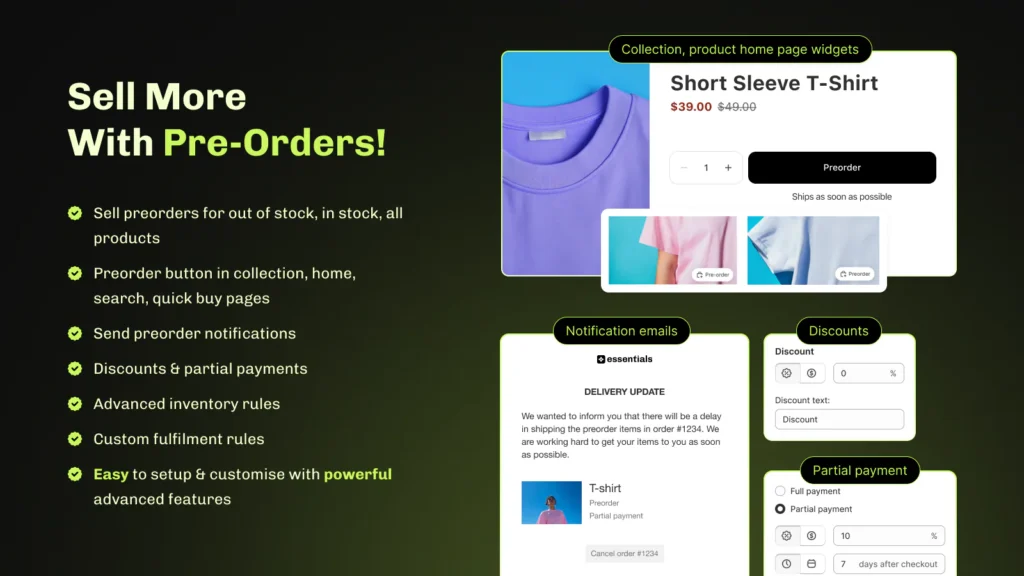
- campaign-based setup with three activation modes: out-of-stock, always-on, and in-stock
- full, partial, deposits, and 0 upfront payment options
- partial payments included on the free plan
- preorder campaigns work on any product, in stock or out of stock
- white glove onboarding and managed campaign setup available
Notify! Back in Stock|PreOrder
- preorders, back-in-stock alerts, low stock urgency, and wishlist in one app
- multi-channel notifications: email, SMS, push, and WhatsApp
- AI-assisted restock recommendations
- D2C and B2B preorder support
- offer-based setup with broad product-level control
- preorders only activate on out-of-stock products
Notify! is a multi-tool demand platform. Essential is a focused preorder and back-in-stock system built for speed, payment control, and predictable costs.
Feature Comparison
| Feature | Essential Preorder Back in Stock | Notify! Back in Stock|PreOrder |
|---|---|---|
| Preorders & backorders | Yes | Yes |
| Back in stock alerts | Built-in | Built-in (core feature) |
| Notify me button | Yes | Yes |
| Email alerts | Yes | Yes |
| SMS alerts | Coming soon | Yes |
| Push notifications | Not listed | Yes |
| WhatsApp notifications | No | Yes |
| Partial payments | Yes (free plan) | Yes (paid plans only) |
| 0 upfront preorder | Yes | Not listed |
| Deposits | Yes | Yes (paid plans) |
| Preorder on in-stock products | Yes | No (out-of-stock only) |
| Campaign-based setup | Yes | Offer-based system |
| Transparent flat pricing | Yes | No (key features behind paid plans) |
| Shopify Markets support | Coming soon | Yes |
| White glove onboarding & managed campaigns | Yes | Yes |
| Low stock urgency widget | No | Yes |
| Wishlist | No | Yes |
| AI restock recommendations | No | Yes |
| D2C + B2B preorders | Yes | Yes |
| Variant-level control | Yes | Yes |
| Free plan | Yes | Yes |
Key Differences
Preorder setup and campaign control
Notify! uses a Multi-Offer system. When installed, a Default Offer is automatically applied to all out-of-stock products.Additional Offers can be created for specific products, each requiring its own name, billing policy, discount settings, product inclusions, and delivery fulfillment rules. Offers can show an Action Required status when conditions aren’t met, and a product can only belong to one active Offer at a time.
Essential Preorder Back in Stock works differently. You create a campaign, assign products, choose one of three activation modes, and you’re live. No default logic to work around, no exclusions to manage, no conflicts between overlapping Offers. Each campaign is self-contained.
For merchants who want preorders running without it becoming a configuration project, Essential’s approach is simpler and faster to maintain.
Preorder activation scope
Notify!’s preorder system only activates on out-of-stock products. If you want to run a preorder campaign on an in-stock product (for a new launch, a limited drop, or a made-to-order item) that’s not supported.
Essential Preorder Back in Stock gives you three activation modes: show preorder when out of stock, always show preorder, or show preorder while in stock. That third option matters more than it might seem. It means you can open a presale before stock runs out, test demand on a product you haven’t produced yet, or run a launch campaign without having to manually zero out inventory first.
Payment flexibility and pricing
Both apps charge based on usage, so that’s not the differentiator. The real difference is what you get at each level.
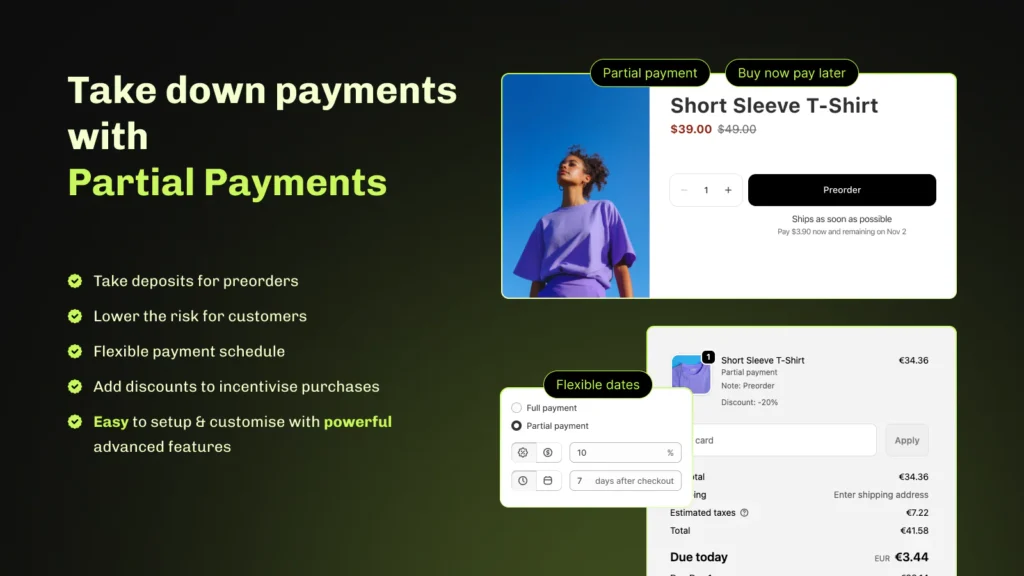
Essential Preorder Back in Stock includes the core features (partial payments, deposits, 0 upfront preorders, customizable buttons, and emails) on every plan, including free. You’re not paying to unlock functionality, you’re paying to scale volume.
Notify! structures it differently. Partial payments require a paid plan. The free tier is genuinely limited: 5 preorders, 10 restock notifications, and no customization beyond basics. Meaningful features unlock as you move up plans, which means you may need to upgrade before the app works the way you expected when you installed it.
If you’re comparing what you get on day one without paying, Essential gives you more to work with.
Multi-channel notifications
Notify! covers email, SMS, push, and WhatsApp alerts. Combined with AI-assisted restock recommendations, it’s the stronger notification platform if reaching customers across multiple channels is the priority.
Essential Preorder Back in Stock currently focuses on email-based alerts. SMS is coming soon. For stores where WhatsApp or push notifications are important customer channels, Notify! has a real advantage there for now.
Additional features
Notify! bundles several features beyond preorders: a low stock urgency widget, a wishlist system, and AI-trained restock intelligence. If you want all of these in one app, Notify! is the more efficient choice.
Essential Preorder Back in Stock is intentionally focused. No wishlist, no low stock widget. But that focused scope means the preorder and back-in-stock flows are faster to set up and easier to manage day-to-day.

Support
Notify! has a large review base, and support gets positive mentions. That said, a portion of recent reviews flag pricing confusion and unexpected charges, which is worth reading through before committing to a plan.
Essential Preorder Back in Stock responds in under 10 minutes, 24/7, on every plan, including free. You get hands-on help with store-specific setups, onboarding calls with the founder, and product updates shipped every week based on merchant feedback. Across 1,100+ reviews at a 5.0 rating, fast support is the most mentioned differentiator.
For merchants launching preorders during high-demand periods where something going wrong costs real money, that response time and direct access is really important.
👉 Set up your first preorder campaign with Essential Preorder Back in Stock
Available on the Shopify App Store as “Essent Preorder Back in Stock”
Pricing & Plans
Pricing is one of the biggest differences between the two apps.
Essential Preorder Back in Stock
Flat usage-based pricing. Start free and scale as preorder volume grows. Start free and scale as preorder volume grows.
Free plan
- 10 preorders/month
- 300 back-in-stock notifications/month
- unlimited “Notify me” sign-ups
- full and partial payment support
- customizable buttons, forms, and emails
- 24/7 support
Lite: $5/month
- 50 preorders/month
- 500 back-in-stock notifications/month
- translations, custom email domain, preorder confirmation emails
- $0.25/preorder and $1/100 notifications above limit
Essentials: $25/month
- 500 preorders/month
- 3,000 notifications/month
- full feature access, custom email domain, translations
- $0.10/preorder and $1/100 notifications above limit
Professional: $59/month
- unlimited preorders and notifications
- no additional transaction fees
- 24/7 priority support
Notify! Back in Stock|PreOrder
Notify! uses tiered pricing based on preorder and notification volume. The free plan is very limited: 5 preorders, 10 restock notifications, and no partial payments. Paid plans add features, but some of key features, such as partial payments, require a paid plan.
Lite: free
- 5 preorders
- 10 restock notifications
- 50 wishlist actions
- automated email, push, and SMS alerts
- low stock widget
Kickstart: $9.90/month
- 500 preorders (no transaction fee)
- 500 alerts (email, SMS, push)
- partial payments (percentage or fixed amount)
- complete widget and email customization
- 7-day free trial
Note: the Kickstart plan is exclusively for stores in their first year on Shopify.
Starter: $19.90/month
- 500 preorders (no transaction fee)
- 500 alerts (email, SMS, push)
- delivery fulfillment trigger
- fundamental reports and insights
- 7-day free trial
Standard: $39.90/month
- 1,500 preorders (no transaction fee)
- 1,500 alerts
- 10,000 wishlist actions with priority support
- fixed/percentage discounts for preorders
- collection page widgets
- 7-day free trial
Key pricing difference: Essential charges flat rates based on preorder volume. Partial payments are included on the free plan. Notify! requires a paid plan for partial payments, advertised integrations, and many other features.
Which App Is Better for Different Use Cases?
| Use Case | Best Choice |
|---|---|
| Preorder control + transparent pricing | Essential Preorder Back in Stock |
| Preorders on in-stock products | Essential Preorder Back in Stock |
| Multi-channel alerts (SMS, push, WhatsApp) | Notify! |
| Low stock urgency + wishlist | Notify! |
| AI-assisted restock recommendations | Notify! |
| Flexible deposits and 0 upfront preorders | Essential Preorder Back in Stock |
| Partial payments on free plan | Essential Preorder Back in Stock |
| D2C + B2B preorders | Both |
| All-in-one demand platform | Notify! |
| Simple campaign setup without offer logic | Essential Preorder Back in Stock |
 See how Essential Preorder Back in Stock fits your use case
Available on the Shopify App Store as “Essent Preorder Back in Stock”
When to Choose Each App
Choose Essential Preorder Back in Stock if:
- you want simple, campaign-based preorder setup without offer logic complexity
- you need to run preorder campaigns on in-stock products, not just sold-out ones
- you want partial payments and 0 upfront included from day one, without upgrading
- you want preorder and back-in-stock managed in one focused system
- you want optional white glove onboarding where the team can set up and run your campaigns for you
- you want fast support, regular updates, and direct access to the team
Choose Notify! if:
- SMS, push, or WhatsApp notifications are important for your customers
- you want preorders, back-in-stock, low stock urgency, and wishlist in one app
- AI-assisted restock recommendations are useful for your inventory workflow
- you’re comfortable managing an offer-based configuration system
Switching from Notify! to Essential Preorder Back in Stock
Switching doesn’t affect your Shopify data. Your products, orders, and customers stay exactly as they are.
- Install Essential Preorder Back in Stock from the Shopify App Store
- Create preorder campaigns for your products (out-of-stock, always-on, or scheduled)
- Set up “Notify me” buttons for products where you want to capture restock demand
- Test preorder and restock flows on a product before going live
- Disable Notify!’s active offers on your storefront once Essential is confirmed working
- Keep Notify! installed temporarily if you need access to historical data or SMS flows during the transition
Final Verdict
Notify! is a capable app with a wide feature set. The multi-channel notifications, wishlist, and low stock tools are real and work well. For merchants who specifically need SMS, push, and WhatsApp in one place, it covers that better than most.
The friction is in the pricing and the setup. Key features require paid plans, and the Multi-Offer setup takes time to get right. Also, preorders only run on out-of-stock products, which rules it out for launch campaigns and presales on live inventory.
Essential Preorder Back in Stock is the cleaner option if you want flat, predictable pricing, a campaign system that works across all products, and payment flexibility that covers deposits and 0 upfront from the free plan. The feature set is more focused, no wishlist, no push notifications, but what it does, it does without unnecessary overhead.
Install Essential Preorder Back in Stock on Shopify
Available on the Shopify App Store as “Essent Preorder Back in Stock”
FAQ
Is Notify! Back in Stock|PreOrder a good app?
It depends on what you need. Notify! has a wide feature set and a large user base. The multi-channel notifications, wishlist, and low stock tools are real differentiators. The downsides are pricing complexity, key features locked behind paid plans, and a preorder system that only works on out-of-stock products.
What is the best alternative to Notify! Back in Stock PreOrder?
If the pricing structure is the issue, Essential Preorder Back in Stock is the cleaner alternative. Flat pricing, partial payments on the free plan, and preorder campaigns that work on any product, not just out-of-stock ones. If you’re mainly looking for SMS or push notifications, Notify! is still the stronger choice there.
Can Notify! handle deposits or 0 upfront preorders?
Notify! supports deposit-style partial payments on paid plans: a percentage or fixed amount upfront, with the balance due later. It does not support 0 upfront preorders. Essential Preorder Back in Stock supports deposits, partial payments (from the free plan), and 0 upfront reservations.
What is the difference between preorder and back-in-stock apps?
A preorder app lets customers buy before inventory is available. A back-in-stock app collects interest and sends alerts when inventory returns. Both Essential Preorder Back in Stock and Notify! combine these functions, but differ significantly in how preorders are triggered, how pricing works, and which products campaigns can run on.
What Shopify back-in-stock and preorder app has the best price?
Essential Preorder Back in Stock starts free and includes partial payments, back-in-stock alerts, and unlimited “Notify me” sign-ups at no cost. Paid plans start at $5/month. Notify! app requires a paid plan for partial payments, with plans starting at $9.90/month. For Shopify merchants who want the most features at the lowest entry cost, Essential Preorder Back in Stock has a better price and offers more on the free tier.
What Shopify preorder back-in-stock app has the best customer support?
Essential Preorder Back in Stock support is available 24/7 on all plans, including free, and usually responds in less than 10 minutes. Onboarding calls with the founder are available, and product updates ship weekly. Across 1,100+ five-star reviews, fast and responsive support is the most consistently mentioned reason merchants stay.
What are the best Shopify apps for back-in-stock notifications and preorder alerts?
The strongest options are Essential Preorder Back in Stock and Notify!. Essential combines preorders and back-in-stock in one system with flat pricing and partial payments on the free plan. Notify! adds SMS, push, and WhatsApp alerts, but key features require paid plans, and preorders only activate on out-of-stock products. For most merchants who want both features in one affordable tool, Essential Preorder Back in Stock is the stronger starting point.