You want to increase average order value, but generic product recommendations aren’t moving the needle. A bundle builder changes that. It lets you group complementary products together, show the savings, and give customers a reason to buy more in a single transaction.
As Shopify professionals, we’ve been both: the developers and the Shopify merchants. And after years of research, we know one thing for certain: the right bundle builder on Shopify does this without requiring code, integrates with your existing theme, and actually gets set up in minutes. Here’s how to build one that converts and things you shouldn’t forget.
What a Shopify Bundle Builder Actually Does
A bundle builder lets you create custom product bundles directly on your store. Customers select items from your catalog, see the total price drop, and check out with multiple products at once. The merchant benefit is clear: higher AOV per transaction.
Unlike static bundles that require manual SKU creation, a real Shopify bundle builder works dynamically. You pick the products, set the discount, and the tool handles the rest. The customer experience is smooth. The backend is simple.
Why Bundles Drive More Revenue
Bundles work because they solve a customer problem: choice paralysis and cost uncertainty. When you show a bundle at a 15-20% discount, you’re removing friction. The customer knows exactly what they’re getting and why it’s a better deal than buying separately.
On the merchant side, bundles increase AOV without increasing acquisition cost. You’re working with traffic you already have. A customer who lands on a product page and sees a bundle option is more likely to add additional items than if you just upsell them randomly.
Bundles also move slower inventory. If you have overstock on complementary items, bundle them together and watch sell-through improve.

Setting Up a Shopify Bundle Builder: Step by Step
The setup process depends on your tool choice. A solid bundle builder should work out of the box with zero coding required.
Step 1: Choose Your Bundle Strategy
Decide what you want to bundle before you set up the tool. Are you creating:
- Starter bundles (entry-level products at a discount)
- Premium bundles (high-ticket items bundled together)
- Seasonal or themed bundles (holiday sets, gift packages)
- Complementary product bundles (accessories with core products)
Your strategy determines which products appear together and what discount level makes sense. A 15% discount on a $100 bundle feels right. A 5% discount on a $50 bundle feels weak.
Step 2: Select Your Products
Pick 2-5 products per bundle. More than five creates too much complexity. Customers want clarity, not decision fatigue.
Choose products that actually complement each other. A coffee maker bundled with filters and a grinder makes sense. A coffee maker bundled with socks does not. Your bundle should feel intentional, not random.
Step 3: Configure Discount and Display Settings
Set your bundle discount percentage. Test 15-20% off. This is aggressive enough to feel like a real incentive without destroying margin.
Decide where the bundle appears on your store. Product pages work best because the customer is already interested in a related category. You can also show bundles on collection pages or the home page, depending on your layout.
Step 4: Customize the Bundle Look
Your bundle builder should let you customize colors, button text, and layout. Make it match your brand so it doesn’t look like a separate tool bolted onto your store. Keep the design clean. Customers need to understand what the bundle is and why it’s a better deal in under three seconds.
Step 5: Test and Launch
Add a bundle to a test product page first. Make sure the bundle displays correctly on desktop and mobile. Verify the discount applies at checkout. Then roll it out to your highest-traffic pages.
Monitor the first two weeks. Track bundle attach rate (how many customers who see the bundle add it to their cart) and check that margins are healthy. Adjust discount levels if needed.
Where to Place Your Bundles for Maximum Conversion
Placement matters as much as the bundle itself. A bundle hidden at the bottom of the page underperforms the same bundle placed above the fold.
Product Pages
This is the highest-intent location. A customer viewing a specific product is primed to add related items. Place your bundle near the add-to-cart button or just below the product description. Make sure it’s visible without scrolling on mobile.
Collection Pages
Show bundles prominently in collection grids if you have themed collections. A “Best Sellers Bundle” in your most-visited collection will capture attention early in the shopping journey.
Cart Page
Cart bundles work well as post-purchase recommendations. A customer who has already committed to buying one item is receptive to adding more. Keep the bundle offer simple and relevant to what’s already in their cart.
Checkout
A bundle recommendation at checkout is your last chance to increase the order value before payment. Use this strategically. Don’t overwhelm the checkout flow with too many options.

Bundling Best Practices
Price Bundled Items Lower Than Separate Purchases
Customers need to see clear savings. Show the original price and the bundled price side-by-side. If a bundle doesn’t save the customer money, it won’t convert. A discount between 15-25% is the sweet spot for most product categories.
Use Bundle Copy to Create Context
Instead of just “Product A + Product B,” use language that explains why these products belong together. “Everything You Need to Get Started” or “The Complete Setup” tells a story. It makes the bundle feel like a curated offer, not an accident.
Test Different Bundle Combinations
Your first bundle probably won’t be your best-performing bundle. A and B might convert at 3%. Try A and C and watch it jump to 5%. Test different price points too. A 20% discount might outperform 15%. Or it might cannibalize full-price sales. Test and measure.
Use Data to Refine Bundles Over Time
Track which bundles customers actually add to their carts. If a bundle sits at 0.5% attach rate after two weeks, swap one of the products. Keep your highest-performing bundles live, rotate out the weak ones, and test new combinations quarterly.
Common Bundle Mistakes to Avoid
Too many bundles on one page kills conversion. Customers see three bundle options and choose none. Limit yourself to one primary bundle per page.
Bundling products that don’t make sense together confuses customers. They’ll skip the bundle and buy single items instead. Bundle strategy should be intentional.
Discounts that are too small don’t feel like offers. A 5% bundle discount is invisible. Go 15% or higher or don’t bundle at all.
Forgetting to promote your bundles is another silent killer. If bundles only appear when customers scroll to them, you’re leaving money on the table. Feature bundles prominently in collections, email campaigns, and paid ads.
How to Measure Bundle Performance
Track three metrics to know if your bundle is working.
First, attachment rate: what percentage of customers who see the bundle add it to their cart. Target 2-5% as healthy. Below 1% means your bundle offer or placement needs work.
Second, average order value lift: are customers who buy a bundle spending more per transaction than customers who don’t? A 10-15% AOV increase indicates the bundle is doing its job.
Third, margin impact: make sure you’re not discounting so aggressively that you lose profitability. A bundle should increase gross dollar profit per transaction, not just increase transaction count.
Setting Up Bundles With Essential Upsell & Cross Sell
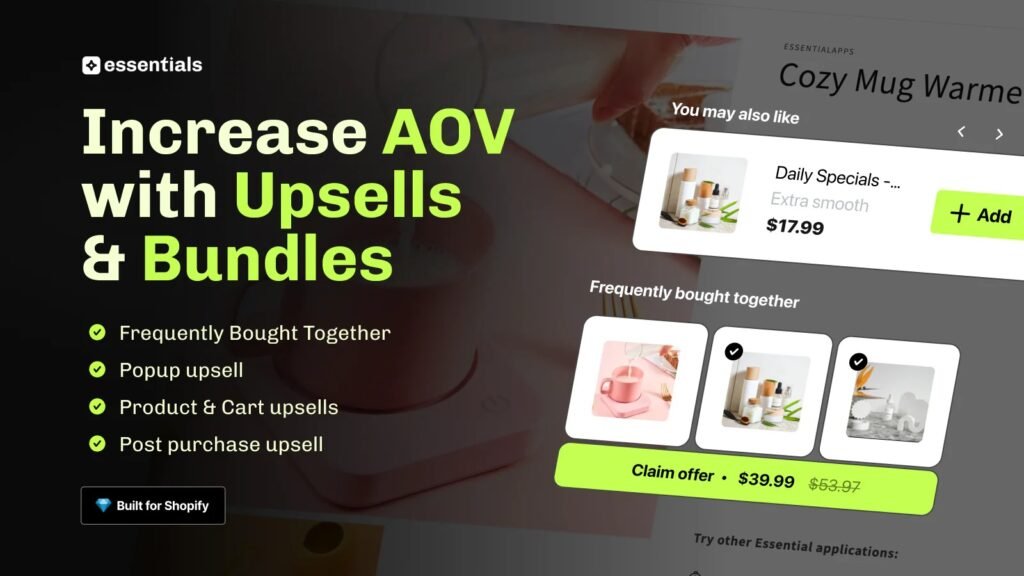
Essential Upsell & Cross Sell gives you a Shopify bundle builder with pre-built templates that require zero code. You pick your products, set your discount, and the bundle goes live on any page in minutes.
The Shopify bundle app integrates directly with your store theme and works on mobile and desktop without custom CSS. You can create multiple bundles for different product categories or seasons and track performance for each one individually. Essential Upsell & Cross Sell handles the design and conversion logic, so you focus on strategy and testing.
The app also shows you exactly how your bundles are performing. You’ll see attachment rates, revenue generated, and which product combinations convert best. This data helps you refine your bundles and test new combinations without guessing.
Frequently Asked Questions
Can I create bundles without using a Shopify app?
You can create static bundles using Shopify’s native tools by creating manual SKUs or variant selections, but this requires creating duplicate SKUs and managing inventory manually. A product bundle app like Essential Upsell & Cross Sell automates this and tracks performance without the backend overhead.
What’s the best discount percentage for a product bundle?
Most successful bundles use a 15-20% discount. This feels substantial enough to incentivize purchase without destroying margin. Test your specific products to find the sweet spot between conversion rate and profitability.
Can I create bundles on product pages and collection pages at the same time?
Yes. Essential Upsell & Cross Sell lets you place the same bundle across multiple pages or create different bundles for different locations. Product pages typically convert highest, so prioritize those first.
How do I know if my bundle is actually profitable?
Track the average order value increase and compare it to your discount cost. If a bundle increases AOV by $30 and the discount costs you $8, you’re making $22 in additional profit per bundle sold. Use your app’s analytics to monitor this automatically rather than calculating manually.
What products should I bundle together?
Bundle complementary products that customers often buy together or products that make logical sense as a set. Shampoo with conditioner, a camera with a lens, a coffee maker with filters. Avoid random combinations. The bundle should tell a story or solve a complete customer problem.