After spending years in the Shopify community, we’re certain that most Shopify merchants leave money on the table simply because they’re not bundling products strategically. A customer buys one item, checks out, and leaves. You never asked them about the complementary product they actually need.
Product bundling works because it solves two problems at once. It increases your average order value (AOV) by encouraging customers to buy more per transaction. It also improves the customer experience by showing them products that actually go together, not random upsells they didn’t ask for.
But picking the right bundle app matters. Some are overkill, some are missing features you need, and some slow down your store. Here’s how to pick the right one for your business.
What a Product Bundle App Actually Does
Shopify bundle app lets you group products together and sell them as a package, often at a discount. Instead of a customer buying a phone case for $15, they see an option to buy the case plus a screen protector for $22. They get a deal, you get a bigger order.
But the real power is flexibility. Good bundle apps let you create different types of bundles for different situations. You can bundle on product pages, in cart, at checkout, or even via email. You can create fixed bundles (this exact set), volume bundles (buy 3 get 10% off), or flexible bundles (pick any 3 items for $50).
The app should also track performance. You need to know which bundles are converting, which are sitting dead, and what your ROI actually is. If a bundle isn’t moving, you kill it and try something else.
The Five Things to Look For
1. Works Without Code
You shouldn’t need a developer to create a bundle. The app should have a visual builder where you add products, set prices, write descriptions, and publish. If it requires custom code or liquid edits, it’s too complicated for most merchants.
2. Multiple Bundle Types
Different bundle types solve different problems. Bundles on product pages capture attention before customers decide what to buy. Cart bundles work for customers who’ve already committed to buying something. Checkout bundles are your last chance to add one more item before they leave.
You want an app that supports at least product page bundles and cart bundles. Some merchants do best with both active at the same time. Some test one first, then layer in another.
3. Flexible Discount Options
Fixed discounts (10% off all bundles) are simple but not smart. You want volume-based discounts (buy 2 get 5% off, buy 3 get 10% off), tiered pricing (this bundle is $50, this one is $80), or percentage discounts that vary by bundle.
You should also be able to offer bundles at a fixed price regardless of the products inside. This works well for themed bundles like “Starter Kit” or “Complete Bundle.”
4. Real Performance Tracking
The app needs to show you which bundles convert and which don’t. Look for metrics like bundle attach rate (what percentage of orders include a bundle), revenue per bundle, and conversion rate by bundle. Without this, you’re flying blind.
5. Fast Load Time
If the bundle app adds 2+ seconds to your page load time, it’s hurting more than it’s helping. Slow pages kill conversions. Test the app on a staging store before going live, and check page speed with and without it active.

Common Bundle App Mistakes
Bundling the Wrong Products
Don’t just bundle products with the highest margins. Bundle products that customers actually buy together. If you sell coffee, bundle coffee with filters or mugs, not with unrelated items. Look at your order history first. What do your best customers actually purchase in the same transaction?
Using the Same Bundle Everywhere
The bundle that converts on a product page might not convert in the cart. The products that work for email might not work on your homepage. Test different bundles in different places and measure the results. Kill what doesn’t work.
Offering Too Many Bundles
More choices sounds good in theory. In practice, it paralyzes customers. Start with 2-3 strategic bundles. Measure their performance for 2-4 weeks. Then add more if they’re working. You can always expand later.
Forgetting to Update Inventory
If your bundle app doesn’t sync with your inventory, you’ll sell bundles you can’t fulfill. Make sure the app tracks inventory in real time and removes bundles from view when they’re out of stock.
How to Evaluate an App Before You Buy
Most bundle apps for Shopify offer a free trial or a free plan. Use it. Create a test bundle on a real product and measure what happens. Don’t just look at the dashboard; actually see how it appears to customers.
Ask these questions during the trial period:
- Can I create a bundle in under 5 minutes without help?
- Does the bundle display look professional on mobile?
- Does it work with my theme without conflicts?
- Can I see the actual performance data I need?
- Is the support responsive when I have a question?
If you can’t answer yes to all of these, the app probably isn’t the right fit.
Essential Upsell & Cross Sell: A Practical Option
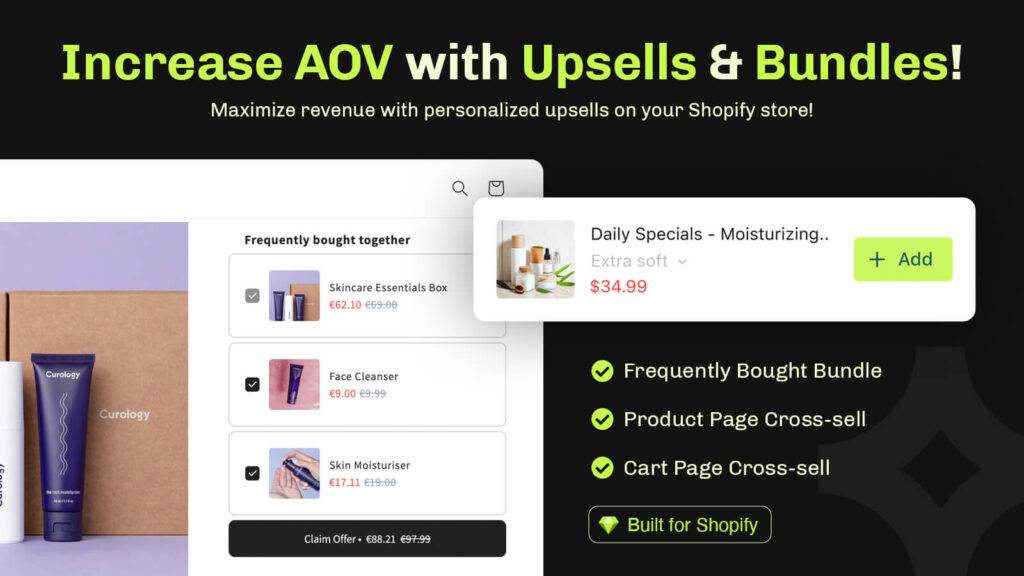
Essential Upsell & Cross Sell is built specifically for Shopify merchants who want bundling without complexity. The app handles product bundles, volume bundles, and cart bundles with a clean interface that requires no code. You add products, set your discount or price, and the bundle goes live immediately.
The app tracks which bundles drive the most revenue and attach rate, so you can see what’s actually working in your store. It integrates with your existing theme without requiring edits, and performance testing shows it adds minimal load time.
Many merchants use it to test bundling quickly before deciding whether to invest in more advanced options. Others use it as their main bundling strategy because it does exactly what they need: increase AOV with minimal setup and maintenance.
Getting Started with Your First Bundle
Pick one product category to start. Look at what sells well and what could benefit from a complementary add-on. Create a single bundle on the product page for that category. Set the discount modest: 10-15% is usually enough to encourage the purchase without killing the margin.
Run it for 2-3 weeks and measure. Look at how many people see the bundle, how many add it to the cart, and how many actually purchase. If the attach rate is above 5%, keep it and expand. If it’s below 3%, pause it and try a different product combination.
Bundling isn’t a one-time thing. It’s an ongoing test of what your customers want to buy together. The merchants who see the biggest AOV gains are the ones who create bundles, measure results, keep what works, and kill what doesn’t.
Frequently Asked Questions
Can I create a product bundle without an app on Shopify?
Yes, you can create manual bundles by adding multiple products to a single collection or using discount codes, but this requires more work and doesn’t let customers see the bundle discount dynamically. A bundle app automates this and shows the discount instantly, which drives more conversions.
What’s the best way to discount a product bundle?
Start with a 10-15% discount on the bundle total. This is enough to incentivize purchase without cutting margin too deep. Test volume discounts (buy 2 bundles, get 5% off) if you’re running it in cart. Track attach rate and adjust based on what converts best for your store.
How do I use Essential Upsell & Cross Sell to create bundles?
Essential Upsell & Cross Sell lets you create bundles by selecting products, setting a discount or fixed price, and choosing where the bundle displays (product page, cart, or both). The app handles the rest, no coding required. You can create, edit, and publish bundles in minutes.
What percentage of orders should include a bundle?
A healthy bundle attachment rate is 5-15%, depending on your category and discount. If it’s below 3%, the bundle placement or discount isn’t compelling enough. If it’s above 20%, you might be pushing too hard, or the bundle is just too good a deal. Track it weekly and adjust your strategy based on the trend.
Can a bundle app handle out-of-stock products?
Good Shopify bundle apps like Essential Upsell & Cross Sell sync with your inventory in real time and remove bundles from view when items run out. This prevents overselling and keeps your bundling strategy from creating fulfillment problems. Always check that the app you choose has active inventory management.