Looking for a Preorder, Back In Stock – STOQ alternative for Shopify?
STOQ is one of the most capable apps in this category: Built for Shopify, 5 stars across nearly 3,000 reviews, used by 18,000+ stores. It covers preorders, backorders, deposits, partial payments, back-in-stock alerts, SMS notifications, B2B preorders, Klaviyo sync, multi-location, Shopify Markets, and campaign scheduling. For most merchants, it’s a serious contender.
The main area where Essential Preorder Back in Stock goes further is payment depth: split payments, 0 upfront preorders, and deferred payment schedules are features STOQ doesn’t prominently offer. If your store runs high-ticket launches, made-to-order products, or campaigns where installment-style payments drive conversion, that difference matters.
Quick Verdict
- Best overall Shopify preorder app: Essential Preorder Back in Stock
- Best for SMS alerts + no transaction fees on all plans: STOQ
- Best for split payments and 0 upfront preorder campaigns: Essential Preorder Back in Stock
These are two of the most closely matched apps in the preorder category. Both have Built for Shopify badge, both support deposits and partial payments, and both have campaign scheduling and strong analytics. STOQ has a slight edge on SMS alerts and offers no transaction fees across all paid plans. Essential Preorder Back in Stock has the edge on payment structures (split payments, 0 upfront, and deferred schedules) and a campaign-based setup that gives merchants more preorder activation modes to work with.
👉 Install Essential Preorder Back in Stock and test it on your store
Available on the Shopify App Store as “Essent Preorder Back in Stock”
Essential Preorder Back in Stock vs STOQ
Both apps help Shopify merchants:
- sell out-of-stock products via preorder and backorder
- collect demand through “Notify me” waitlists
- send automated back-in-stock alerts
- accept deposits and partial payments
- run B2B and D2C preorder campaigns
- sync with Klaviyo and support Shopify Markets
- track demand with analytics and reporting
The differences are narrower than most comparisons in this category.
Essential Preorder Back in Stock wins on:
- split payments and installment-style payment schedules
- 0 upfront preorders: reserve without immediate payment
- deferred payment with due date control per campaign
- three campaign activation modes for flexible preorder logic
STOQ wins on:
- SMS alerts alongside email, built in, not an add-on
- no transaction fees on all paid plans (Essential only removes fees on Professional)
- auto-collect balance payments on Lite plan and above
- strong brand reputation: 18,000+ stores, nearly 3,000 reviews.
The honest positioning: Both apps handle the core preorder and back-in-stock workflow well. The choice comes down to whether you need split payments and 0 upfront (Essential) or SMS alerts with no transaction fees on all paid plans (STOQ).
Feature Comparison
| Feature | Essential Preorder Back in Stock | STOQ |
|---|---|---|
| Preorders & backorders | Yes | Yes |
| Back in stock alerts | Built-in | Built-in |
| Notify me button | Yes | Yes |
| Email + SMS alerts | Email core, SMS not listed | Yes (email + SMS) |
| Partial payments | Yes | Yes |
| Deposits | Yes | Yes |
| Auto-collect balance payments | Yes | Yes (Lite+) |
| Split payments | Yes | Not listed |
| 0 upfront preorder | Yes | Not listed |
| Deferred payment schedules | Yes | Not listed |
| Campaign scheduling (start/end dates) | Yes | Yes (Lite+) |
| B2B preorders | Yes | Yes |
| Multi-location | Yes | Yes |
| Shopify Markets / multi-language | Yes | Yes (Lite+) |
| Klaviyo sync | Yes | Yes |
| Reminder alerts | Yes | Yes |
| Demand analytics | Yes | Yes |
| No transaction fees | Yes (Professional plan) | Yes (all plans) |
| Free plan | Yes | Yes |
Key Differences
1. Payment structures
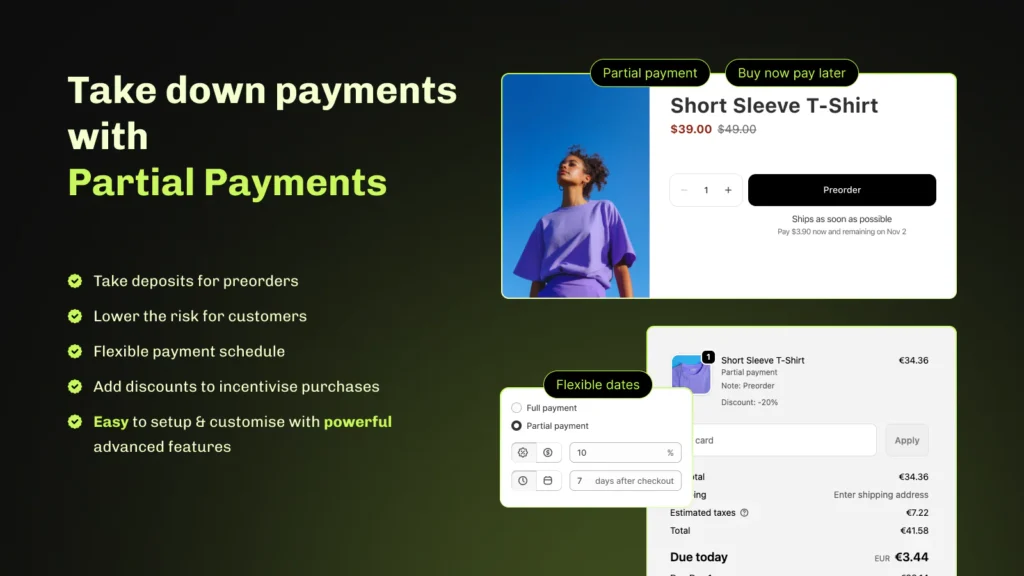
Both apps support deposits, partial payments, and auto-collect balance on paid plans. This covers the most common deposit use case for most merchants.
Essential Preorder Back in Stock adds three payment options STOQ doesn’t prominently list:
- split payments: customers pay in installments over time
- 0 upfront preorders: customers reserve without any immediate charge
- deferred payments with a specific due date per campaign
For stores selling high-ticket items, custom or made-to-order products, or running launches where 0 upfront commitment increases sign-ups, these options are a meaningful advantage.
2. SMS notifications
STOQ includes email and SMS back-in-stock alerts as a core feature: customers can opt in to receive notifications through either channel. For stores where SMS engagement rates are higher than email, this is a real advantage.
Essential Preorder Back in Stock focuses primarily on email-based alerts and automated back-in-stock notifications. If your restock strategy is email-driven, this covers the core need well. If SMS is important to your customer base, STOQ has the stronger built-in offering.
3. Transaction fees
STOQ charges no transaction fees on paid plans, but does charge per preorder above each plan’s monthly limit: $0.25 per preorder above limit on Lite, $0.10 on Pro. Essential Preorder Back in Stock works the same way on lower tiers, with overages of $0.25 per preorder on Lite and $0.10 on Essentials. Both apps remove overage fees entirely on their top plans: STOQ on Unlimited ($69/month), Essential on Professional ($59/month).
So the transaction fee framing isn’t a real differentiator. The more honest comparison is unlimited preorders: STOQ reaches it at $69/month, Essential at $59/month.

4. Campaign activation modes
Both apps support campaign scheduling with start and end dates on paid plans. STOQ processes preorders through Shopify’s native preorder system, with full admin integration and variant-level control.
Essential Preorder Back in Stock adds three distinct campaign activation modes: show preorder when out of stock, always show preorder, or show preorder while in stock. This covers a wider range of real ecommerce scenarios: rotating products in and out of preorder status, running always-on campaigns for made-to-order items, or scheduling launches without manual intervention.
5. Support
Both apps are consistently praised for fast, hands-on support. STOQ reviewers frequently describe the team as going above and beyond, with custom theme integrations resolved quickly and migration support for merchants switching from other apps.
Essential Preorder Back in Stock offers fast-response support (typically under 10 minutes) plus onboarding calls with the founder, hands-on technical help, and weekly product updates.
Need preorders, deposits, and back-in-stock alerts in one app?
Essential Preorder Back in Stock is the stronger pick for most Shopify stores.
Pricing & Plans
Essential Preorder Back in Stock
Uses usage-based pricing. Start free and scale as preorder volume grows.
Free
- 10 preorders/month
- 300 back-in-stock notifications/month
- unlimited “Notify me” sign-ups
- full and partial payment support
- customizable buttons, forms, and emails
- 24/7 support
Lite – $5/month
- 50 preorders/month
- 500 back-in-stock notifications/month
- translations, custom email domain, preorder confirmation emails
- $0.25/preorder and $1/100 notifications above limit
Essentials – $25/month
- 500 preorders/month
- 3,000 notifications/month
- full feature access, custom email domain, translations
- $0.10/preorder and $1/100 notifications above limit
Professional – $59/month
- unlimited preorders and notifications
- no additional transaction fees
- 24/7 priority support
STOQ
STOQ uses tiered pricing based on preorder and alert volume, with no transaction fees on all paid plans and a 14-day free trial on paid tiers.
Free
- 30 preorders/month
- 100 back-in-stock alerts/month
- full and partial payment support
- unlimited registrations
- 0% transaction fees
Lite – $10/month
- 100 preorders/month, then $0.25 per additional order
- 1,000 back-in-stock alerts/month
- campaign scheduling (start and end dates)
- auto-collect balance payments
- multi-language, Shopify Markets, remove STOQ branding
- 0% transaction fees
Pro – $29/month
- 400 preorders/month, then $0.1 per additional order
- 2,000 back-in-stock alerts/month
- all Lite features
- 0% transaction fees
Unlimited – $69/month
- unlimited preorders and alerts
- support on Slack
- 0% transaction fees
Key pricing difference: Both apps charge per preorder above monthly limits on mid-tier plans – STOQ at $0.25/preorder on Lite and $0.10 on Pro, Essential at $0.25 on Lite and $0.10 on Essentials. Unlimited preorders cost $69/month on STOQ and $59/month on Essential. Essential is cheaper at the top tier and includes split payments and 0 upfront options that STOQ doesn’t offer.
Which App Is Better for Different Use Cases?
| Use Case | Best Choice |
|---|---|
| Best overall preorder app | Essential Preorder Back in Stock |
| Preorder + back-in-stock combined | Both |
| Deposits and partial payments | Both |
| Auto-collect balance on deposits | Both (paid plans) |
| Campaign scheduling | Both (paid plans) |
| Split payments and deferred schedules | Essential Preorder Back in Stock |
| 0 upfront preorder campaigns | Essential Preorder Back in Stock |
| SMS alerts | STOQ |
| B2B preorders | Both |
| No transaction fees (all plans) | STOQ |
| Product launches and presales | Both |
| Scaling preorder operations | Both |
👉 See how Essential Preorder Back in Stock fits your store before your next launch or restock cycle.
When to Choose Each App
Choose Essential Preorder Back in Stock if:
- you need split payments, 0 upfront preorders, or deferred payment schedules
- you want three distinct campaign activation modes for flexible preorder logic
- you want preorder and back-in-stock workflows with per-campaign payment control
- you want unlimited preorders for $59/month
- you’re already using other Essential Apps and want tools that work together
- you want hands-on support with founder access and weekly product updates
Choose STOQ if:
- SMS alerts are important alongside email for your restock strategy
- you want no transaction fees on all paid plans, including lower tiers
- deposits and partial payments cover your payment needs without split installments
- you want unlimited preorders for $69/month
- you value a large install base and extensive review history for confidence
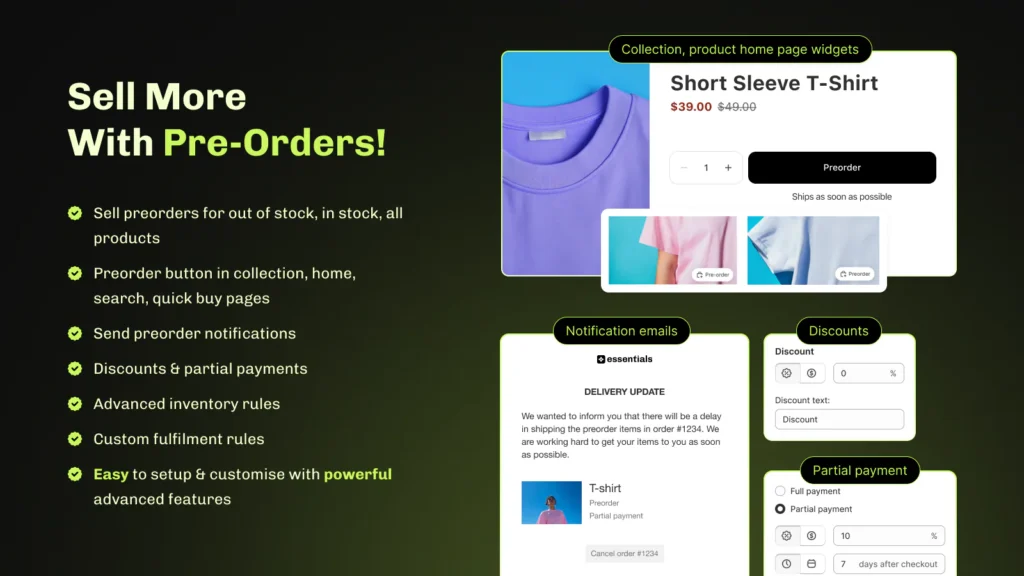
Switching from STOQ to Essential Preorder Back in Stock
Switching is straightforward. No code changes or data migration are required. Your products, orders, and Shopify data stay exactly as they are.
- Install Essential Preorder Back in Stock from the Shopify App Store
- Create preorder campaigns for your products (out-of-stock, always-on, or scheduled)
- Set up “Notify me” buttons for products where you want to capture restock demand
- Test preorder and restock flows on a product before going live
- Disable STOQ on your storefront once Essential is confirmed working
No data loss. No migration required. Reach out to support directly from the app if you need help during the switch.
Final Verdict
STOQ is one of the best preorder and back-in-stock apps available for Shopify. Nearly 3,000 reviews, Built for Shopify, 18,000+ installs, strong SMS support, and no transaction fees across all paid tiers. For most merchants running standard preorder and restock workflows, it’s a capable and fairly priced solution.
Essential Preorder Back in Stock is the stronger choice when payment flexibility is the priority. Split payments, 0 upfront preorders, and deferred payment schedules give merchants more tools for converting demand on high-ticket products and made-to-order launches: payment structures that STOQ doesn’t currently offer.
For merchants whose primary need is deposits and partial payments, either app works well. For those running more complex payment flows, Essential Preorder Back in Stock is the more complete solution.
👉 Get started and launch your first campaign in minutes
FAQs
What is the best alternative to STOQ on Shopify?
Essential Preorder Back in Stock is the strongest alternative for merchants who need split payments, 0 upfront preorders, or deferred payment schedules alongside a full preorder and back-in-stock system. For merchants whose needs are covered by deposits and partial payments, STOQ remains a well-built option.
Does STOQ support deposits and partial payments?
Yes. STOQ supports full payments, deposits, and partial payments on preorders across all plans, with auto-collect balance on paid tiers. It does not prominently list split payment schedules or 0 upfront preorder options.
Does STOQ have SMS alerts?
Yes. STOQ includes email and SMS back-in-stock alerts as a core feature. Customers can opt in to receive notifications through either channel. Essential Preorder Back in Stock focuses primarily on email-based alerts.
Which app is cheaper for high-volume preorders?
Both apps reach unlimited preorders on their top plans: STOQ at $69/month (Unlimited) and Essential Preorder Back in Stock at $59/month (Professional), both with no transaction fees. Essential is $10/month cheaper at that tier and includes split payments and 0 upfront options that STOQ doesn’t offer. If volume is the only factor, Essential wins on price. If SMS alerts matter more than payment flexibility, STOQ is still worth considering.
What Shopify app offers both preorder and back-in-stock features in one tool?
Both Essential Preorder Back in Stock and STOQ combine preorders and back-in-stock alerts in one app. Essential adds split payments, 0 upfront preorders, and deferred payment schedules that STOQ doesn’t currently offer. STOQ adds SMS alerts and no transaction fees on all paid plans.
What is the best Shopify preorder app for partial payments with a free plan?
Essential Preorder Back in Stock Shopify app offers partial payments on the free plan. STOQ also has a free plan with partial payment support. If you decide to upgrade, Essential’s paid plans start at $5/month; STOQ’s at $10/month.
Which e-commerce app offers the best back-in-stock and preorder notifications?
Essential Preorder Back in Stock and STOQ are two of the most closely matched options in this category. Both have Built for Shopify badges, offer support deposits, partial payments, campaign scheduling, and Shopify Markets. STOQ adds SMS alerts. Essential adds split payments and 0 upfront preorders. Essential is also $10/month cheaper on the unlimited plan.
Does Essential Preorder Back in Stock have a free plan?
Yes. With the free plan, you can get 10 preorders per month, 300 back-in-stock notifications, unlimited “Notify me” sign-ups, full and partial payment support, and 24/7 support. Essential paid plans start at $5/month and scale with preorder volume, reaching unlimited preorders and notifications at $59/month.