
Your customers are asking when they’ll get their order. You’re telling them the shipping date. They’re frustrated because that’s not really what they want to know. There’s a real difference between when something ships and when it arrives, and your store needs to show the right date at the right time.
We’ve worked with multiple Shopify stores over the years and understand just how important precise shipping dates and delivery dates are. If you’re still wondering how the two differ and how to create the best shipping experience for your customers, you’re in the right place. Here’s all you need to know about shipping date vs delivery date.
Shipping Date vs Delivery Date: The Core Difference
A shipping date is when your fulfillment center sends the package out. A delivery date is when the customer receives it at their door. Those are two different things, and conflating them costs you customer satisfaction and support tickets.
When a customer places an order on Monday, they don’t care when it ships on Tuesday. They want to know if it arrives by Friday. That’s the delivery date. Yet many Shopify stores only show shipping timelines, leaving customers in the dark about actual arrival.
Why This Distinction Matters for Your Store
Customers make purchase decisions partly on delivery speed. If you show vague “ships in 2-3 business days” messaging, you lose trust. A customer who thinks they’re getting their order on Wednesday but gets it on Friday feels let down, even if the shipping happened on time.
Showing accurate delivery dates reduces support requests. When customers know exactly when to expect their package, they don’t email asking, “Where is my order?” on day four. They wait until day five, knowing that’s when it arrives. This cuts support volume and improves satisfaction simultaneously.
Delivery dates also affect buying behavior. Customers abandon carts when they don’t know when they’ll get their items. If you tell them “delivered by Saturday,” they buy. If you tell them “ships out next week,” they leave and shop with a competitor who promised a date.
How to Calculate Realistic Delivery Dates
Start with your actual fulfillment time. If orders take 2 business days to pick, pack, and ship, that’s your baseline. Then add carrier transit time based on destination.
Most carriers publish transit times by zip code. USPS takes 1-3 days for Priority Mail. UPS and FedEx vary from 1-5 days depending on service level and distance. Build your calculation around the carrier you use most.
Add a buffer. If USPS says 2-3 days, calculate for 3 days. This protects you from late deliveries that disappoint customers. Beating a delivery date is always better than missing it.
Example Calculation
An order was placed on Wednesday at 2 PM. Your fulfillment takes 1 business day, so it ships on Thursday. USPS Priority Mail from your location to the customer takes 2 business days. Delivery arrives Saturday. Your estimated delivery date should show Saturday to the customer at checkout.
If you only told them “ships Thursday,” they’d expect it Friday or Saturday and feel confused when Saturday arrives. Showing the delivery date eliminates that gap.

When to Show Each Date to Customers
Show the estimated delivery date at checkout and in order confirmation emails. This is the number that drives purchase decisions and manages expectations. It’s what the customer cares about most.
The shipping date matters less to customers but is useful for internal tracking and fulfillment teams. Include it in your backend systems and post-purchase emails if it helps operations, but don’t lead with it in customer-facing messaging.
During the post-purchase window, once tracking information is available, show the carrier’s real-time delivery estimate alongside your original estimate. Customers want to see live tracking anyway, and real data beats your calculation once the package is in transit.
Handling Variable Fulfillment Times
If some orders ship same-day and others take 3 days, your calculation needs to account for your slowest scenario. This prevents promising a Tuesday delivery when you can only guarantee Wednesday.
Better approach: calculate delivery dates dynamically based on product availability and your actual fulfillment capacity that day. If you’re behind, your estimates shift accordingly. This keeps promises realistic and reduces late deliveries.
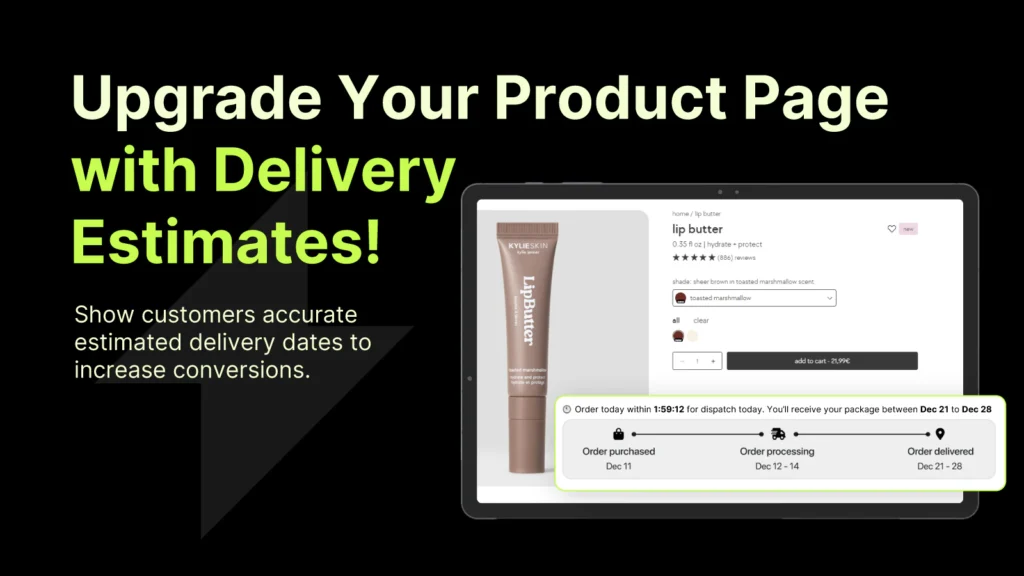
Essential Estimated Delivery Date handles this automatically. The app calculates delivery windows based on your fulfillment time and carrier transit times, then displays them at checkout so customers see accurate delivery dates before they buy. It eliminates the guessing and the missed expectations.
Managing Customer Expectations Around Holidays and Weekends
Most carriers don’t deliver on weekends or holidays. Your calculations must account for this. If an order ships Friday evening, it won’t arrive Monday. It arrives Tuesday at the earliest, assuming Monday isn’t a holiday.
During peak seasons like December, carrier transit times stretch. What normally takes 2 days takes 4. Update your calculations during these windows or risk broken promises.
Show this context to customers. If delivery will take longer due to holiday volume, say so at checkout. Transparency prevents frustration.
The Technical Side: How Shopify Stores Display Delivery Dates
Shopify’s default checkout doesn’t calculate or display estimated delivery dates. You’re responsible for adding this layer. Some stores use custom code in their theme. Others use an app that does the math and displays dates automatically.
The custom code approach requires developer resources and ongoing maintenance. Anytime carrier times change or you adjust fulfillment, you update the code. It’s doable but adds complexity.
An app-based solution removes that burden. Essential Estimated Delivery Date integrates with your Shopify store and automatically calculates delivery windows based on product-level fulfillment times, carrier selection, and destination. You set it once, and it runs. Customers see accurate dates at checkout without any coding on your part.
Common Mistakes to Avoid
- Don’t promise delivery dates you can’t keep. If your fastest realistic delivery is 5 days, don’t show 3 days to customers just to close sales. You’ll have returns, chargebacks, and a destroyed reputation.
- Don’t ignore seasonal changes. The holiday season, summer vacations, and winter weather all affect what you can promise. Review and adjust your calculations quarterly at a minimum.
- Don’t show the same delivery date for all zip codes. Customers across the country have different transit times. The East Coast and West Coast shouldn’t have identical delivery windows.
- Don’t forget to account for cutoff times. If you’re an e-commerce store, orders placed after 3 PM might not ship until the next day. Your calculation needs to reflect when that order actually starts fulfillment.
Putting It All Together
The difference between the shipping date and the delivery date is simple but critical. Shipping is when you send it. Delivery is when they get it. Customers only care about delivery.
Calculate your true delivery windows based on fulfillment time plus carrier transit time. Add a safety buffer. Display the delivery date prominently at checkout and in confirmations. Update seasonally and as your operations change.
Essential Estimated Delivery Date automates this entire process. Set your fulfillment times and carrier preferences once, and the app displays accurate delivery dates at checkout, in cart, and in customer emails. It reduces cart abandonment by giving customers the information they want and improves satisfaction by meeting the promises you make. That’s the kind of operational leverage that drives both revenue and customer loyalty.
Frequently Asked Questions
What’s the difference between estimated delivery date and shipping date?
Shipping date is when your warehouse sends the package. The estimated delivery date is when the customer receives it. Customers care about the delivery date because that’s when they get their order.
How do I calculate estimated delivery time for Shopify?
Add your fulfillment time (how long it takes to pick, pack, and ship) plus carrier transit time for the destination zip code, then add a 1-day buffer. Essential Estimated Delivery Date automates this calculation and displays the date at checkout.
Should I show delivery dates or shipping dates at checkout?
Show delivery dates. That’s what drives purchase decisions and manages customer expectations. Shipping dates are internal tracking information.
How do I adjust delivery dates for holidays?
Account for non-delivery days when calculating transit time. If your order ships on Friday and Monday is a holiday, the earliest delivery is Tuesday. Review your calculations quarterly and adjust during peak seasons when carrier times extend.
What app shows estimated delivery dates on Shopify?
Essential Estimated Delivery Date is built for Shopify stores and automatically calculates delivery windows based on fulfillment time and carrier transit, displaying accurate dates at checkout without requiring code.