Most Shopify stores leave money on the table after a customer completes checkout. The purchase is done, the customer is gone, and you never get another shot at that transaction. But there’s a proven way to fix this: post-purchase upsells capture additional revenue from buyers who are already in a spending mindset and have payment info saved.
We’ve worked with multiple Shopify stores over the years and learned that the best time to offer a relevant product is in the moments right after someone buys. That’s when they’re most likely to add to their order, and you can dramatically increase your average order value without spending more on acquisition.
What Is a Post Purchase Upsell?
Shopify post-purchase upsell is an offer presented to a customer immediately after they complete their order. This can appear on the thank you page, in a post-purchase modal, or via email within minutes of checkout. The goal is simple: get them to buy something else before they leave.
Unlike standard upsells during checkout, post-purchase offers work because the friction is already gone. They’ve already entered payment details, made a buying decision, and confirmed the order. You’re not asking them to trust you—they just did.
Why Post Purchase Upsells Work on Shopify
Post-purchase upsells boost AOV in three key ways. First, they target customers who are actively spending and have proven buying intent. Second, they happen at the moment of peak happiness—the purchase is confirmed and the customer is feeling good. Third, they require minimal friction because checkout is already complete.
Merchants who implement post-purchase upsells typically see 10-30% of buyers take the offer, depending on the product relevance and offer quality. That means a store doing $50,000 per month in sales can reasonably expect an extra $5,000-$15,000 in revenue just from capturing these moments.
Common Post Purchase Upsell Strategies
Complementary Products
Offer a product that pairs naturally with what they just bought. A customer who buys a wireless speaker might purchase speaker stands or cables. A buyer of skincare buys serums. These feel helpful, not pushy, because they solve a real need created by the original purchase.
Volume Discounts
If someone bought one item, offer them a discount on buying three or five. This works especially well for consumables, accessories, and items customers buy repeatedly. The urgency and savings create quick conversion.
Product Bundles
Create bundles that save customers money when they buy multiple items together. A bundle offer for “get two items for $40” converts better than offering items individually at full price, even though you might give up margin. The psychology of the deal matters.
Limited-Time Offers
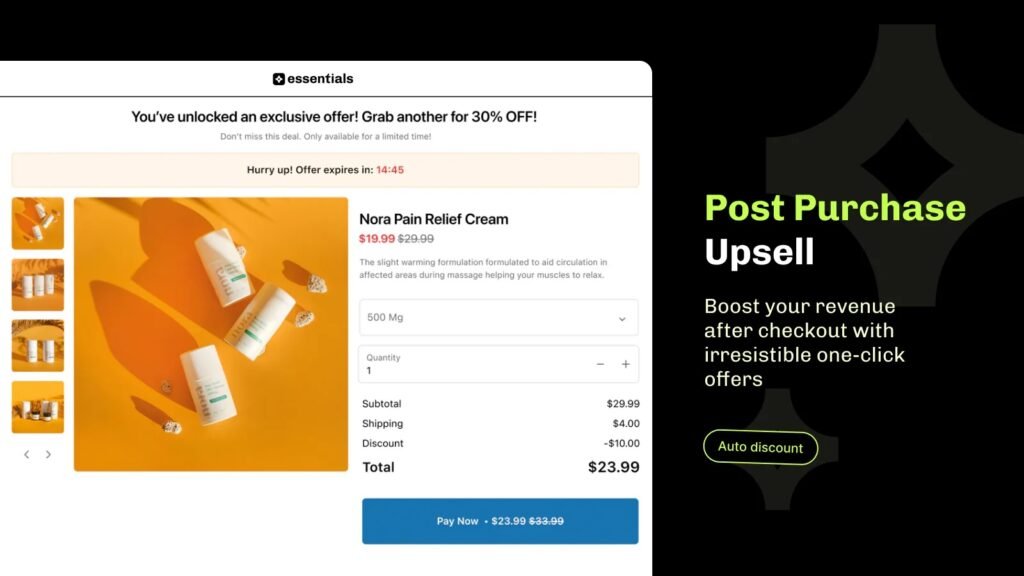
Add urgency with a time-limited discount available only to customers who just purchased. “Complete your order in the next 10 minutes and get 15% off” with a visual countdown timer creates scarcity and drives immediate action. Time-based offers work best because customers are still in the checkout mindset.
How to Set Up Post Purchase Upsells on Shopify
The mechanics of setting up a post-purchase upsell depend on your approach. You can use Shopify’s native features, third-party apps, or custom code. For most merchants, an app is the fastest and most reliable route because it handles the logic, targeting, and tracking without requiring developer resources.
If you build something custom, you’ll need to inject offers into your thank you page template, manage the upsell orders separately from the original order, and track conversions. This takes time and introduces bugs. Most stores see better results using a dedicated tool that’s already built for this purpose.
Using an Upsell App
The easiest approach is to use an app designed specifically for post-purchase offers. These apps sit between Shopify and your customers, intercepting the thank you page or creating a post-purchase funnel that converts buyers before they leave.
A good post-purchase upsell Shopify app should let you target offers by customer data, product purchased, and cart value. You should be able to set different offers for different segments, track ROI by offer, and manage inventory. Essential Upsell & Cross Sell handles all of this out of the box with no code required. You can set up your first offer in minutes, target it to specific products or customer segments, and start capturing additional revenue immediately. The app integrates directly with Shopify checkout, so offers appear to customers at exactly the right moment.
Best Practices for Post Purchase Upsell Offers
Make It Relevant
An offer that has nothing to do with what someone just bought feels spammy and kills your shot at repeat customers. Show a complementary product, a natural next-step item, or a volume discount on the same category. Relevance is the difference between 5% conversion and 25% conversion.
Keep It Simple
Don’t offer five products or three different discounts. Pick one compelling offer and lean into it. Customers who just bought are not in the mood to browse. They want to leave or move to the next thing. A single, clear call to action converts better.
Use High-Quality Images
If you’re showing a product, make sure the image is clean, professional, and shows the product clearly. Bad product images kill conversion. Spend the same effort here as you do on your main store.
Test Your Discount Level
Don’t assume what discount works. Try 10%, 15%, and 20% off on different offers and segments. Track which discount level drives the most revenue, not just the most orders. Sometimes a smaller discount on higher-margin items beats a big discount on lower-margin ones.
Monitor Abandon Rates
If your upsell offer causes customers to abandon the purchase entirely, it’s too aggressive. A very small percentage of customers will leave when offered something else, but if you see a spike in cart abandonment on the thank you page, dial back the offer or change the product.
Tracking and Measuring Success
To know if your post-purchase upsells are working, track these metrics:
- Conversion rate: What percentage of customers offered the upsell actually accept it?
- Revenue per customer: How much extra revenue does each upsell generate?
- AOV increase: By how much does your average order value rise with upsells active?
- Margin: Is the extra revenue worth the discount you’re giving?
Most app dashboards show these numbers clearly. If your upsell converts at 15% and the average upsell order is $35, and you get 1,000 customers a month, that’s 150 extra orders at $35, or $5,250 in pure additional revenue. Now you know what this tactic is worth.
Common Mistakes to Avoid
Offering Too Much
A 50% discount on a $100 item might feel generous, but it trains customers to wait for upsell offers and kills your margin. Start conservative and only increase the discount if conversion is too low.
Targeting Everyone the Same Way
A customer who just spent $200 may not need the same offer as someone who spent $30. Segment your offers by order value, product category, or customer type. Essential Upsell & Cross Sell lets you create rules so different customers see different offers based on what they just bought.
Making It Too Complicated
Multiple conditions, complex rules, and too many products to choose from paralyze customers. Keep the decision simple. One product. One offer. One button.
Not Testing Enough
Your first offer won’t be your best offer. Run different products, discounts, and messaging against each other. Change one variable at a time and track the results. Over a few months, you’ll find your highest-converting combination.
Post Purchase Upsells vs. One-Click Upsells
Post-purchase upsells happen after checkout is complete. One-click upsells (or post-purchase checkout upsells) happen during checkout but after the initial purchase. Both work, but they serve different purposes.
Post-purchase offers are less risky because the original order is already secure. Customers have less friction accepting an additional offer. One-click upsells feel more integrated into the checkout flow but require careful setup to avoid cart abandonment.
Most successful stores use both. Run a one-click upsell for a premium product during checkout, then follow up with a complementary product offer on the thank you page. This maximizes your chances of capturing additional value from each buyer.
Getting Started Today
The fastest way to start capturing post-purchase revenue is to pick one product that complements your bestseller, decide on a reasonable discount (10-20%), and get an offer live this week. Don’t wait for the perfect strategy. You’ll learn more from running a real offer for a month than from planning for three months.
Essential Upsell & Cross Sell is built specifically for Shopify stores that want to boost AOV without adding complexity. Set up your first offer, monitor the results, and iterate. Most merchants see positive ROI within the first 30 days.
Frequently Asked Questions
How quickly after checkout should I show a post purchase upsell offer?
Immediately. The moment a customer lands on the thank you page, they’re still in a buying mindset. Delays of even a few seconds reduce conversion. The fastest time to show an offer is the best time.
Can I use post purchase upsells on mobile?
Yes, and mobile is where most of your traffic probably comes from. Make sure your offer displays cleanly on small screens, uses large buttons, and doesn’t require horizontal scrolling. A mobile-optimized offer often converts better than a desktop one.
What’s the best way to handle multiple post purchase upsell offers?
Show one offer at a time, not multiple offers on the same page. If a customer rejects the first offer, you can show a second offer, but stacking them reduces conversion on all of them. Essential Upsell & Cross Sell lets you create sequential offers so customers see a fallback option only if they skip the first one.
How do I make sure post purchase upsells don’t hurt my customer relationship?
Make offers relevant, keep discounts reasonable, and never be aggressive about it. An upsell that feels helpful (offering a charging cable with a phone) builds loyalty. An upsell that feels pushy (offering an unrelated discount) damages it. Let the product do the work.
What discount percentage should I use for post purchase upsells?
Start with 10-15% off and track conversion. If conversion is too low, increase to 20%. If conversion is very high but margin is getting squeezed, lower it to 8-10%. The right discount depends on your product margin and customer expectations, so test and adjust.