Your Shopify cart page is money left on the table if it’s not optimized. Most merchants treat it as a checkout step when it should be a revenue driver. Visitors who reach your cart are already committed to buying, they’re just deciding how much to spend. That’s your moment to increase their order value, reduce friction, and get them to the thank-you page faster.
After working with tens of thousands of Shopify stores and merchants, we cannot stress enough how important the cart page is for conversions. However, the difference between a generic cart page and an optimized one often comes down to only a few tactical changes. Let us walk you through what works, where to focus, and how to avoid the common mistakes that kill conversions.
The Cart Page Is Your Last Chance to Increase AOV
Cart abandonment happens for real reasons: unexpected shipping costs, comparison shopping, buyer’s remorse. But before customers leave, they’re sitting on a page where you can nudge them toward a larger order or address their concerns in real time.
An optimized Shopify cart page does three things at once. It reduces friction by making checkout obvious and fast. It shows relevant upsells and cross-sells that feel helpful, not pushy. And it builds trust by displaying shipping policies, guarantees, and testimonials before checkout.
The result? Higher AOV, lower abandonment, more revenue from the traffic you already have.
Start With Cart Page Speed and Layout
A bloated cart page loses conversions before you even get to the offer. If your page takes more than three seconds to load on mobile, you’re already behind.
First, audit your actual cart load time. Open your cart on mobile in a slow 3G environment. If you see lag, compress images, defer non-critical scripts, and remove unnecessary apps that fire on the cart page. Every extra second increases abandonment.
Next, simplify the layout. Your cart should show three things: what’s in the cart, the total price (including shipping and tax estimates), and a clear checkout button. Everything else, e.g., testimonials, product recommendations, guarantees, comes below the fold or in sidebar space that doesn’t interfere with checkout flow.
The checkout button should be impossible to miss. Use contrast, size, and placement. If visitors have to scroll to find the checkout button, your layout needs work.
Show Trust Signals Above the Fold
Visitors in your cart are thinking about whether to trust you with their money. You have seconds to answer that question.
Add clear trust signals near the top of your cart page. Money-back guarantees, SSL badges, customer reviews, fast shipping badges, and security certifications all reduce friction. Place the best trust badges near your total price or checkout button, wherever a visitor’s eye lands naturally.
If you have a strong guarantee (30-day money-back, free returns), show it on the cart page. Customers hesitating to hit checkout often just need reassurance that they can’t lose.

Optimize for Mobile Cart Conversions
Most Shopify cart abandonment happens on mobile. Mobile visitors are faster, more distracted, and more likely to comparison shop. Your cart page needs to work perfectly on small screens.
Test your cart on actual mobile devices, not just the browser preview. Check that buttons are large enough to tap without zooming. Make sure form fields are easy to fill. Remove pop-ups and overlays that block the checkout button.
On mobile, every pixel matters. Vertical scrolling is fine, but horizontal scrolling kills conversions. Make sure your cart table or product list doesn’t require left-right scrolling.
Use Smart Upsells and Cross-Sells on the Cart Page
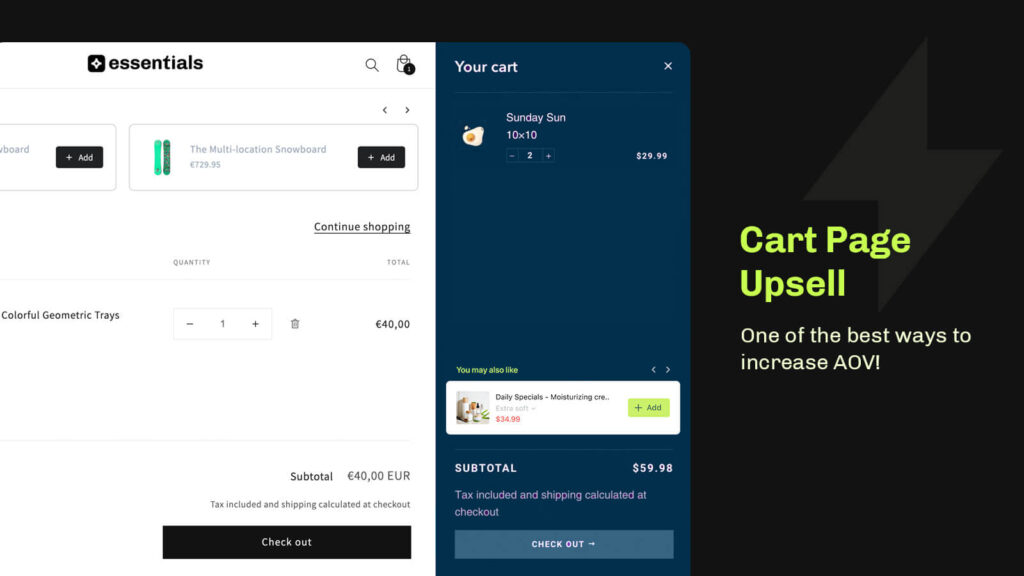
This is where you actually increase AOV. The right Shopify upsell or cross-sell at the right moment can boost average order value by 10-30% without increasing customer acquisition cost.
The key is showing offers that feel relevant and helpful, not random. If someone bought a phone case, suggest a screen protector. If someone is buying a sweater, show complementary colors or seasonal items. If someone’s cart is under $50, show a product that gets them free shipping.
Essential Upsell & Cross Sell makes this easy. Set up product recommendations that trigger based on what’s already in the cart, then watch AOV climb. The app works directly on your Shopify cart page and checkout, so visitors see offers at the moment they’re most likely to buy.
Test different offers and placements. Some merchants see better results with bundles (save $5 when you add product X), others with simple “frequently bought together” recommendations. Track what works for your products and customers.
Reduce Friction With Clear Shipping and Return Info
Unexpected shipping costs are the number one reason carts get abandoned. If your cart page doesn’t show shipping estimates clearly, visitors will leave to figure it out elsewhere.
Display shipping costs prominently on the cart page, or better yet, let customers enter their address to see exact shipping before checkout. Shopify’s default shows estimated costs, but you can add more detail with custom messaging.
Also show your return policy and timeframe. If you have free returns or a long return window, make it visible on the cart page. Removing doubt at this stage dramatically reduces abandonment.
Add Social Proof and Scarcity Where It Makes Sense
Social proof works if it’s real and recent. Add customer reviews or testimonials to your cart page, but only if they’re genuine and recent. A two-year-old review feels stale. A review from last week feels trustworthy.
Low stock or “only 3 left” messaging works, but only if it’s actually true. Fake scarcity destroys trust. If you use it, make sure your inventory system backs up the claim.
For most merchants, customer review and a clear guarantee do more heavy lifting than artificial scarcity.
Test and Measure Cart Page Changes
Cart page optimization isn’t a one-time fix. Small changes compound. Test one thing at a time so you know what actually moves the needle.
Start with these metrics: cart abandonment rate, average order value, and checkout completion rate. Track them before and after each change. If you add an upsell offer, measure whether it increased AOV without tanking completion rate. If you add trust signals, measure whether abandonment dropped.
Use Google Analytics or Shopify’s built-in reports to track cart behavior. Segment by device, traffic source, and customer type. Some changes that help desktop might hurt mobile, or vice versa.
Common Cart Page Mistakes to Avoid
Too many apps firing on the cart page slow it down. If you have pop-ups, chat apps, review apps, and upsell apps all loading at once, your cart page will lag. Audit your apps and disable anything that doesn’t directly impact conversions.
Upsells that feel random or low-quality tank the offer. If you show products that don’t fit, customers will see it as desperate or spammy and lose trust. Be selective about what you recommend.
Checkout buttons that aren’t obvious or aren’t easy to tap lose sales. If your button is small, low contrast, or below the fold, visitors will get frustrated and leave.
Forcing account creation before checkout also kills conversions. Let guest checkout be the default unless you have a strong reason to require accounts.
Bringing It All Together
An optimized Shopify cart page doesn’t require a redesign. It requires focus. Load it fast. Make checkout obvious. Show trust signals. Use relevant upsells that increase AOV without friction. Reduce confusion about shipping and returns. Test and iterate.
If you’re looking to add smart upsells and cross-sells without slowing down your cart, Essential Upsell & Cross Sell does the heavy lifting. It integrates directly with your Shopify cart and checkout, shows personalized recommendations based on what customers have in their cart, and tracks performance so you know what’s working.
Start by measuring your current cart metrics. Then make one change at a time. Within 30 days, you’ll see which optimizations actually move revenue for your store.
Frequently Asked Questions
What’s the best way to show product recommendations on a Shopify cart page?
Use contextually relevant recommendations based on what’s already in the cart, like complementary products or frequently bought together bundles. Essential Upsell & Cross Sell automatically shows these offers at the right moment on your cart and checkout pages.
How do I reduce cart abandonment on Shopify?
Display shipping costs and delivery times clearly, show trust signals like guarantees and reviews, reduce form friction, optimize for mobile, and use relevant upsells to increase AOV. Many merchants find that adding smart product recommendations directly on the cart page with Essential Upsell & Cross Sell helps customers see more value before checkout.
Should I force customers to create an account before checkout?
No. Guest checkout converts much better. Only require accounts if you have a specific business reason, like subscription products or loyalty programs.
How can I show shipping costs on my Shopify cart before checkout?
Use Shopify’s cart calculator to estimate shipping based on customer location and weight. Many third-party apps also add detailed shipping calculators that let customers enter their address to see exact costs on the cart page.
What upsells work best on the cart page?
Complementary products that feel relevant to what’s already in the cart tend to convert best. Also effective are Shopify bundles that offer savings, warranty extensions, and product upgrades. Test different offers to see what resonates with your customers.