Your customers are one second away from abandoning your store. A visitor lands on your product page, likes what they see, but hesitates at checkout. They don’t know you. They can’t see your face. Trust badges are the fastest way to convince them you’re legitimate and worth their money.
The right trust badges reduce friction at the exact moment it matters most. They work because they tap into social proof, security signals, and brand authority all at once. But picking the right ones and placing them strategically makes all the difference between a badge that converts and one that gets ignored.
We’ve spent 4+ years crafting the best trust badges for Shopify and researching what actually works for Shopify merchants. With 40 thousand people trusting our app to manage their trust badges in just the last year, we have a lot of insights to share with you. So, stay tuned and continue reading to learn which trust badges for Shopify actually build customer confidence.
What Trust Badges Actually Do
Trust badges aren’t decorative. They’re conversion tools. A badge works by answering the unconscious question every visitor asks: “Is this store safe? Can I trust this business with my money?”
The best ones address specific fears. Security badges (SSL, PCI compliance) kill payment anxiety. Money-back guarantees remove purchase risk. Shipping badges reduce shipping uncertainty. Customer reviews and testimonials show social proof. Payment method logos (PayPal, Apple Pay, Google Pay) signal familiar, trusted payment processing.
When you stack the right badges in the right places, you’re basically saying: “This is a real business. Your payment is secure. Your purchase is protected. Real people buy from us.” That’s powerful.
Where to Place Trust Badges for Maximum Impact
Location matters as much as the badge itself. A badge in the wrong spot gets scrolled past. A badge at the right moment converts.
Product Page (Above the Fold)
Place security and guarantee badges near your product images or price. This is where customers make the buy/no-buy decision. A simple SSL badge or money-back guarantee badge here reduces hesitation before they even scroll.
Add to Cart Button
Right before checkout, customers need reassurance they’re making the right choice. A guarantee badge or return policy badge here is gold. It’s the last friction point before they commit.
Checkout Page
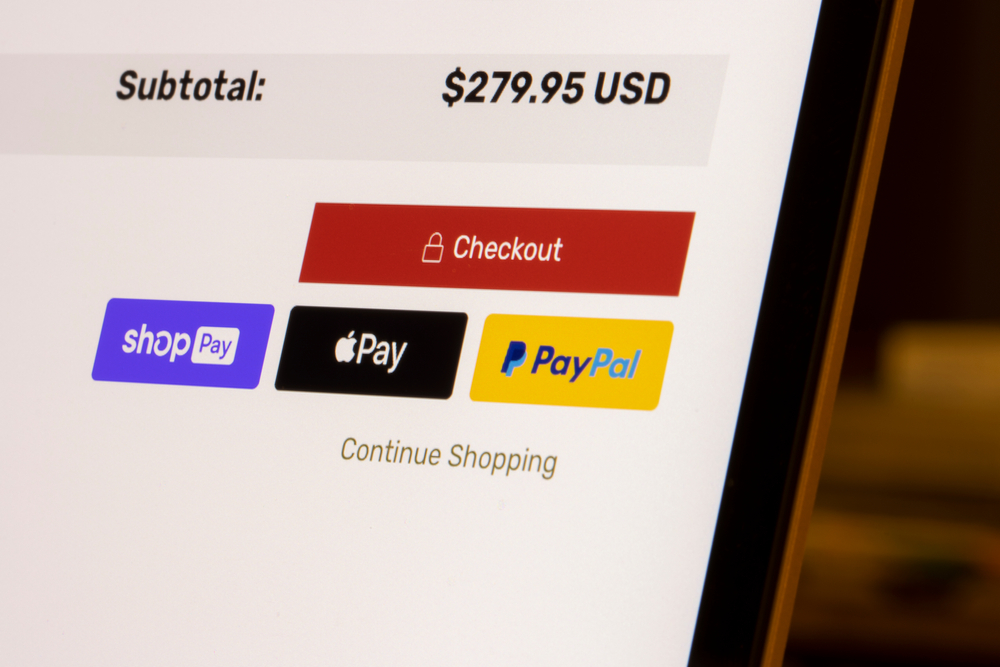
Security badges belong at the top of your checkout, near payment fields. This is where trust anxiety peaks. Payment method logos (Visa, Mastercard, PayPal, Apple Pay) calm that anxiety instantly.
Footer
Your footer should reinforce trust across your entire store. Payment badges, business certification badges, and customer service badges work here. Customers scrolling to the footer are serious and want to verify legitimacy before they leave.
Trust Bar (Sticky Header or Above Header)
A sticky trust bar that follows as customers scroll is one of the highest-converting placements. Display fast shipping, free returns, money-back guarantee, or customer rating here. It keeps trust top-of-mind as they browse.
The Best Types of Trust Badges to Use
Security and Payment Badges
SSL certificates, PCI compliance, and verified security badges are table stakes. Customers expect to see them. If they’re missing, red flags go up. Add logos of payment methods you accept (PayPal, Apple Pay, Google Pay, Shopify Payments, major credit cards). This directly reduces payment anxiety.
Money-Back Guarantees
A clear, visual money-back guarantee badge converts better than a buried policy link. Show customers they have zero risk. Make the guarantee specific: “30-Day Money-Back Guarantee” beats vague promises. Put this on product pages and checkout.
Shipping Badges
Fast shipping, free shipping, and free returns are major purchase drivers. A visual badge confirming “Free Shipping on Orders Over $50” or “Ships Within 24 Hours” removes a major objection. Place these near your product price.
Customer Review and Rating Badges
Real reviews and ratings are social proof. A badge showing “4.9 Stars from 2,340 Reviews” is more convincing than any copy you write. If your store has strong reviews, this badge deserves prominent placement.
Business Certification Badges
If you’re certified, award-winning, or recognized by industry bodies, show it. Trusted shops badge (from Shopify), certified women-owned business, minority-owned certifications, or industry-specific badges build credibility with the right audience.
Trust Seals from Third Parties
McAfee Secure, Norton Secured, or similar third-party trust seals are older but still effective for security-conscious shoppers. They signal that your site has been independently verified.
How to Set Up Trust Badges on Shopify
You have two main approaches to add trust badges on Shopify: custom code or an app. Custom code gives you full control but requires developer skills. An app handles setup without coding and includes pre-designed badge templates that already convert.
Essential Trust Badges & Icons is built specifically for Shopify merchants who want trust badges that work without touching code. It comes with dozens of pre-built badge designs, placement templates, and customization options. You can add badges to product pages, checkout, sticky headers, and footers in minutes.
The setup is straightforward: install the app, choose your badge designs, pick your placements, and publish. No CSS, no liquid code, no development dependencies. The app handles responsive design across mobile and desktop automatically.
Common Mistakes When Using Trust Badges
Too Many Badges
One badge converts. Ten badges confuse. The eye doesn’t know where to look, and none of them stand out. Pick 3-5 of your strongest trust signals per page section. More isn’t better.
Irrelevant Badges
A badge about dog food certifications on a clothing store kills credibility. Use only badges that apply to your business. A security badge always works. A shipping badge works for product pages. But niche certifications only work if they matter to your customers.
Outdated Guarantees
A badge that says “30-Day Money-Back Guarantee” but your policy is actually 60 days breaks trust instantly. Make sure every badge matches your actual policies. Customers will check.
Poor Placement on Mobile
A badge that looks great on desktop can break the mobile checkout flow. Make sure your badges are responsive and don’t crowd the viewport on phones. Essential Trust Badges & Icons automatically scales badges for mobile without you having to adjust anything.
Fake or Unearned Badges
Never use a trust badge you haven’t actually earned or that you’re not authorized to display. Fake reviews, fake certifications, and fake security badges will be caught and destroy your reputation instantly. Stick to what’s real.
Trust Badges That Actually Work
Data shows which badges convert best. Security badges reduce cart abandonment by up to 17% according to major studies. Money-back guarantees increase conversion by 5-10% because they eliminate the perception of risk.
Shipping badges are surprisingly powerful. “Free Shipping Over $50” or “Ships Within 24 Hours” push customers closer to purchase. Customer rating badges work even better if your rating is above 4.5 stars.
The key is testing. Your best-performing badges might differ from another store’s. Track which badges correlate with higher conversion rates, lower cart abandonment, and repeat customers. Then optimize placement and design around those winners.
Custom vs. Pre-Built Badges
You can design custom badges that match your brand perfectly. Custom design builds brand consistency and looks premium. But custom badges take time and cost money if you hire a designer.
Pre-built badges from a Shopify app give you instant, professionally-designed options that are battle-tested across thousands of stores. You can customize colors and text to match your brand without starting from scratch.
For most merchants, pre-built is the move. You get results faster, avoid design mistakes, and can test placement immediately. If you find a particular badge type converts well, you can later invest in a custom design that matches your exact brand.
Monitoring Badge Performance
Install badges, then measure their impact. Watch your conversion rate, average order value, and cart abandonment rate before and after adding badges. Use Shopify’s built-in analytics to track changes in behavior metrics.
If a specific badge placement hurts performance (rare, but possible), remove it. If a placement boosts conversion, double down. Some merchants find checkout badges convert best. Others see bigger lifts from product page badges. Your data will tell you what works for your store.
Test one change at a time so you know exactly which badge caused the improvement. If you add five badges and conversion jumps, you won’t know which one did the work. But if you test placement one at a time, the data is clear.
Final Recommendation
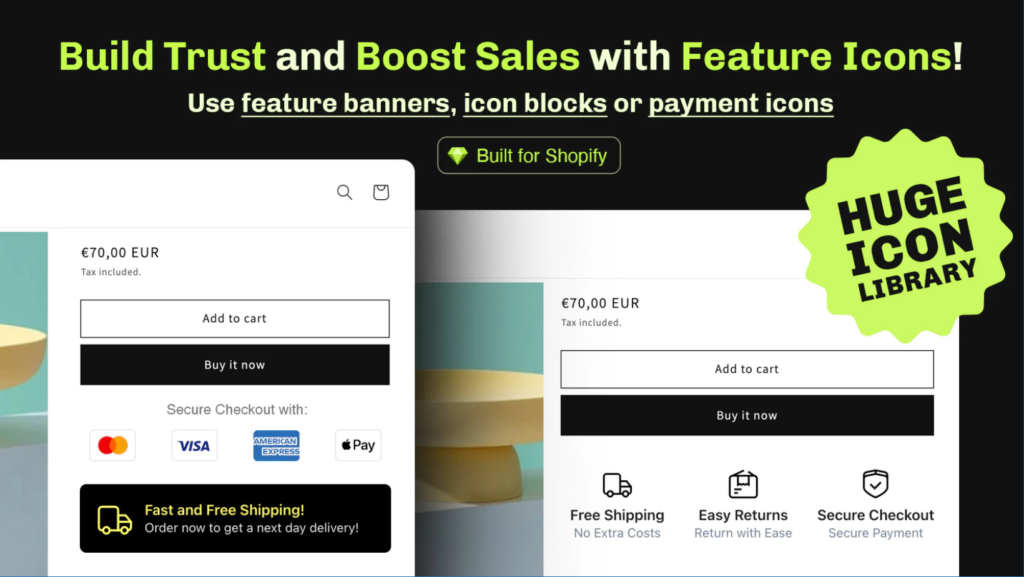
Essential Trust Badges & Icons is the fastest way to add conversion-focused trust signals to Shopify without touching code. It has all the badge types that work (security, guarantees, shipping, reviews, certifications), placement templates that reduce friction at key moments, and mobile-responsive design built in. You can have badges live on your store in under 15 minutes. That speed matters when you’re losing conversions today.
Frequently Asked Questions
What trust badges actually increase conversion rates?
Security badges (SSL, PCI), money-back guarantees, fast shipping badges, and customer rating badges are the most effective. Security badges reduce cart abandonment by 15-17%, while guarantee badges typically boost conversion by 5-10%. Place them where customers make decisions: product pages, checkout, and near the add-to-cart button.
Can I use trust badges on Shopify without coding?
Yes. Essential Trust Badges & Icons lets you add and customize badges through a simple dashboard with no code required. You can place badges on product pages, checkout, headers, and footers using point-and-click controls.
Should I put trust badges on every page?
No. Use 3-5 badges per page section maximum. Product pages need security and guarantee badges. Checkout needs payment and security badges. Footer can include business certifications. More badges create confusion rather than confidence.
How do I know which trust badges work best for my store?
Track conversion rates and cart abandonment before and after adding badges. Test one placement at a time so you can measure impact accurately. Some stores see bigger lifts from product page badges, others from checkout badges. Your data will show what actually works.
Is it okay to use fake or third-party trust badges I didn’t earn?
Never. Using fake reviews, unearned certifications, or misrepresented security badges will destroy trust when customers discover it. Only use badges for things you actually have: real customer reviews, genuine policies, legitimate security certifications, and earned business badges.